
Builder.io is a visual development platform for teams that already have a website or application. It is not a from-scratch website builder in the Squarespace sense, and it is not an AI company-in-a-box. The current product is two related tools: Fusion, a visual IDE that writes into your Git repository, and Publish, a visual / agentic CMS that lets marketers and content teams create pages on top of your existing stack.
That positioning matters. Builder.io is strongest when designers, PMs, marketers, and engineers need to ship inside one codebase and design system. It is a weaker match if you do not have a repo, a host, or anyone to integrate an SDK.
Curious how it stacks up against Willo? Check out our comparison between Builder.io and Willo.
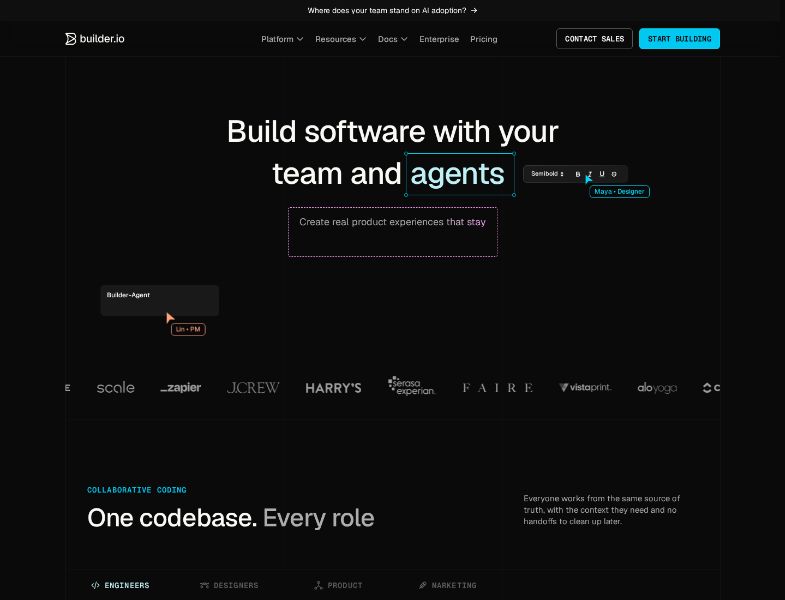
What is Builder.io?
Builder.io was founded in 2018 and is based in San Francisco. The company describes itself as a visual development platform for cross-functional teams shipping web and mobile experiences. Public logos on its site include Everlane, Scale AI, Zapier, J.Crew, Harry's, Experian, Faire, Vistaprint, Alo Yoga, ClickUp, and Panasonic.
The product has two entry points, which you can buy separately or combine:
- Fusion — Visual IDE. Connect a repository, generate or edit UI with AI and a visual canvas, then open a pull request.
- Publish — Agentic / visual CMS. Model content, build pages and campaigns visually, run tests and personalization, and publish with roles and approvals.
Builder's own FAQ puts the split this way: Fusion is for generating and shipping enterprise-ready web apps with your design system and codebase. Publish is for marketing and content teams generating and optimizing experiences with AI plus a drag-and-drop editor. Components created in Fusion can be used as the design system in Publish. Content created in Publish can be pulled into Fusion-built UIs.
On G2, Builder.io is categorized under headless CMS, landing page builders, web content management, and AI app builder. Their listing showed 4.6 / 5 from 26 reviews. That is a small sample; treat it as directional, not a market-wide score.
How Builder.io works
Fusion: visual work that becomes a PR
Fusion's documented workflow is:
- Connect a Git provider. Projects attach to GitHub, GitLab, Bitbucket, or Azure DevOps. Your code stays in your infrastructure.
- Add design-system context. Point Fusion at a second repo, or — on Enterprise — index components so generation follows your tokens and patterns.
- Generate and iterate. Prompt the AI, paste a Figma frame, or edit layout, spacing, styling, and copy visually. Fusion writes real code.
- Send a pull request. Engineers review in the existing pipeline. Teammates can mention @builder-bot on the PR to request changes.
You can also start a branch in Cursor, Claude Code, or Codex and continue in Fusion via MCP. Supported frameworks listed on the Fusion page include React, Next.js, Vue, Svelte, and Angular.
Publish: visual CMS on a site you already host
Publish connects to an existing site or application. You choose how much of the page Builder manages:
- Visual Pages — everything between header and footer (marketing pages, landing pages).
- Visual Sections — a portion of a page, with targeting and scheduling. Current docs mark this as Enterprise-only.
- Structured Data — reusable content fetched anywhere, such as menus.
A typical first Publish project, per the getting-started guide:
- Import a design from Figma (Builder plugin) or from the live web (Chrome extension).
- Add interactivity with Visual Editor AI.
- Integrate Pages and register custom components once, so non-developers can keep creating.
Builder says it passes content to your codebase rather than hosting the site. You keep hosting, SEO plumbing, analytics, and core product flows. That is a real advantage for teams that cannot move off their stack. It is also why Publish is not a one-click “make me a company website” product.
Key features
Visual editor
Publish's visual editor is the feature most reviewers mention. Marketers drag and drop approved components, edit copy in context, and publish without a ticket for every headline change. Fusion has a related visual layer: edit UI on a canvas while the underlying code updates.
Figma import and design-system intelligence
Both products lean on Figma. Fusion turns frames into responsive UI that is supposed to use your components and tokens. Enterprise adds Design System Intelligence, which maps Figma components to code components. Publish can import Figma via Classic Export in the Builder plugin, or copy layouts from the web with the Chrome extension.
Structured content, experiments, and localization
Publish is a CMS, not only a page builder. Official feature lists include:
- Content models, fields, references, and APIs
- Variants, A/B tests, and personalization
- Localization across markets
- Roles, permissions, approvals, previews, environments, and audit trails
Those capabilities are why Zapier, Everlane, and Black Rifle Coffee stories focus on page volume and experiments, not on “we didn’t have a website.”
Builder Agent and MCP
AI is metered as Agent credits. Fusion uses them for code generation and visual edits. Publish uses them for agentic content tasks — generate a page, write variants, complete publishing chores. Team plans add Builder Agent in Slack and Jira, custom MCP servers, commenting, peer review, and a Quality Review Agent that, according to the pricing comparison table, loads the product in a real browser and tests flows touched by a PR.
Git, frameworks, and enterprise controls
Fusion connects to GitHub, GitLab, and Bitbucket on lower plans. Enterprise adds Bitbucket Enterprise, GitLab Enterprise, Azure DevOps, self-hosted or custom Git (add-on), SSO, RBAC, privacy mode, faster environments, and private connectivity behind a firewall.
Builder states it is SOC 2 Type 2 compliant. Product pages also say customer data is not used to train models on Team (opt-out) and is off by default on Enterprise.
What Builder.io does not do
It does not research your market, write a brand guide, open a Stripe account, or run weekly growth loops for a business that does not exist yet. It does not replace your backend, auth, or hosting. Those gaps are intentional. They are also why some people searching “Builder.io alternative” actually need a different category of product.
Pricing and plans
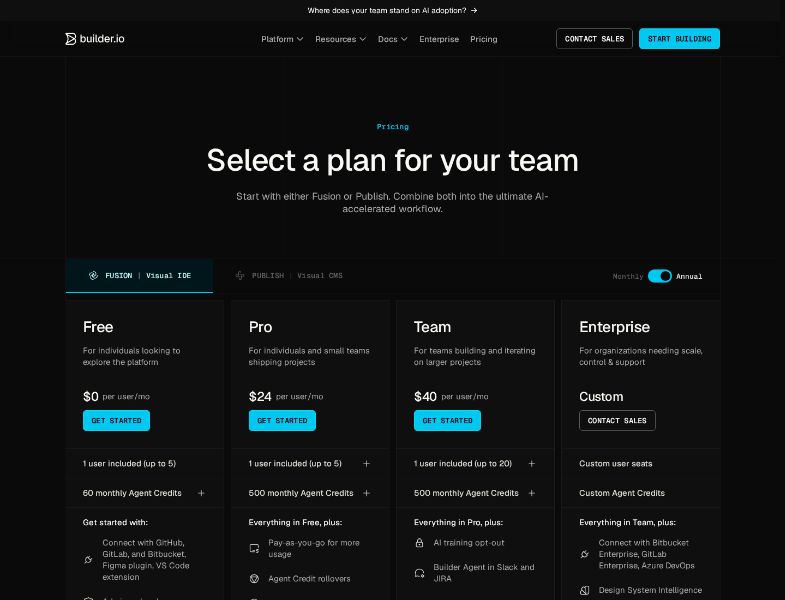
The public page has Fusion and Publish tabs plus a Monthly / Annual toggle. The pricing captured for this review was on Annual.
Fusion (Visual IDE)
| Plan | Price shown (Annual toggle) | Users | Agent credits | Support |
|---|---|---|---|---|
| Free | $0 per user/mo | 1 included, max 5 | 15 daily / 60 monthly | Community forum |
| Pro | $24 per user/mo | 1 included, max 5 | 500 monthly | Standard support |
| Team | $40 per user/mo | 1 included, max 20 | 500 monthly | Priority support |
| Enterprise | Custom | Custom | Custom | SLAs, CSM, customer engineer |
If you need month-to-month Pro or Team pricing, flip the toggle on the live page rather than assuming $24 / $40 is the monthly rate.
Pro and Team include one seat. Extra seats are purchased in-product. Extra Agent credits on Pro/Team are $25 per 500 as a monthly add-on. One-off top-up packs start at $250 (documented as about 20% more expensive than subscription credits) and are not refundable. Paid credits can roll over up to 2× the monthly allocation.
Free credits do not roll over. Adding Free users does not increase the credit cap.
Publish (Visual CMS)
Publish uses the same plan names. Subscription docs add a third meter: volume — visual views and bandwidth. A visual view is a page view that uses Builder visual content. Public dollar amounts for those volume tiers were not published as a simple card in the Fusion-style table. Anyone buying Publish for a live site should confirm view and bandwidth limits with Builder.
Credit pooling also differs. According to the Agent credits documentation, Fusion Pro/Team includes 500 credits per user per month; Publish Pro/Team includes 500 credits per space, shared by everyone in that space.
Other billing details worth knowing
- Subscriptions are per space, not per organization. Fusion and Publish spaces are separate. Using both is two subscriptions.
- Canceling one space does not cancel the others.
- After cancel, the space moves to Free at the end of the billing period.
- Shopify-installed Builder subscriptions are canceled by uninstalling the Shopify app, which also removes Builder content from that store.
- There is no automated way to transfer a subscription from one space to another.
Support by plan
From Builder's help docs:
- Free: forum and documentation. Ticket widget and email require a paid plan.
- Pro and Team: in-app tickets or support@builder.io, 24 hours Monday–Friday GMT. No code or styling support via ticket. No video or phone. No guaranteed response times.
- Enterprise: priority queue, SLAs, customer success manager, customer engineer. P1 incidents covered 24/7.
User feedback and reputation
G2 (26 reviews, 4.6 / 5 as of publishing)
G2's own AI summary of those reviews highlights ease of use and flexibility of the drag-and-drop editor, with some notes that documentation can slow onboarding. Star mix on the seller page: 84% five-star, 11% four-star, 3% one-star.
What reviewers often like
- Marketing can ship landing pages without waiting on engineering. Colin T., Director of Engineering at Black Rifle Coffee Company, wrote that the team migrated and started building in 20 days and called A/B testing “a game changer.”
- Visual editor plus the option to deploy on your own infrastructure. Reinaldo A. (Head of Tech) gave 5/5 and called out the visual editor and multi-cloud flexibility.
- Regular product updates and a responsive enterprise team. Julien C. (Senior Director, Engineering) described self-service A/B testing after an Enterprise upgrade as essential to growth.
- Useful for both small-team prototyping and later enterprise extension, according to Tim D. (Head of Product, Technology).
What reviewers often dislike
- A learning curve for new business users (Elyse H., Julien C.).
- Documentation gaps — plugin docs (Colin T.), or “outdated and incorrect developer documentation” (Tara F., 0.5/5).
- Support quality is mixed. Several older reviews praise named Builder staff. Tara F. and Sam K. described delayed or unhelpful support; Sam K. also said a Pro purchase left the account on Free.
- Occasional editor crashes or slow preview cache (Reinaldo A.).
These are individual reviews, not a survey. Mid-market and enterprise users who completed integration tend to be the happiest. People stuck on setup or billing are the least happy.
Official customer stories
Treat these as company-published claims, not independent audits:
- Zapier: 250+ new pages; experiments that improved homepage conversion (Laura Older).
- Everlane: 100+ personalized homepages in a month (Dave King, CTO).
- J.Crew: 2× faster time to market (Sam Feldman).
- TechStyle / Fabletics: 20% of development budget moved off CMS maintenance (Tim Collins, CTO).
- Black Rifle Coffee: 160+ engineering hours saved per sprint (Colin Tracy).
- Harry's: design to live in one day (Sharon Hau).
The pattern is consistent: Builder.io pays off after a real integration, on a site that already has traffic.
Pros and cons
Pros
- Visual editing that stays in your production codebase and design system
- A genuine CMS layer: models, targeting, experiments, localization
- Figma-to-code and PR workflow that engineers can review
- Works with common frontend frameworks instead of forcing a new host
- Enterprise options (SOC 2 Type 2, SSO, RBAC, private Git) that agencies and regulated teams actually ask for
- Free tier that is enough to connect a repo and try Agent credits
Cons
- You must already have (or be ready to build) a codebase, hosting, and a developer to integrate
- Pricing is per user and per space; Fusion + Publish is two bills; Publish also meters views and bandwidth
- Collaboration features that teams expect (roles, comments, peer review) start at Team, not Pro
- Onboarding and docs are a recurring complaint on G2
- Support SLAs are Enterprise-only; Free users are pointed at the forum
- Agent credit math is usage-based and non-deterministic — a “simple” prompt can cost more than the examples
Limitations and challenges
Integration is the product. Until a developer registers components and connects Git or the SDK, marketers cannot do the thing the homepage promises. Budget time for that project.
Two products, two mental models. Fusion is a Git-centric IDE. Publish is a CMS with visual views. Teams that buy the wrong space, or expect one subscription to cover both, get surprised.
Credit and volume unpredictability. Builder docs give example credit costs (roughly 16 credits for a Figma carousel into a demo, 18 for an onboarding prototype, 37 for a settings page from a PRD) and immediately warn that generative AI is non-deterministic. Publish bandwidth includes media downloads and API reads/writes.
Docs drift. The pricing page lists Free credits as 15/day and 60/month. One section of the Agent credits FAQ still mentions 25/day and 75/month. When sources disagree, use the pricing page and ask support if you are on the fence.
Not a business operating system. There is no built-in research team, Stripe onboarding for a new company, or weekly growth engine. If that is what you wanted, you are in the wrong category.
Who Builder.io is best for
- In-house product orgs with React, Next.js, Vue, Svelte, or Angular already in production
- Marketing teams blocked on engineering tickets for pages, tests, and campaigns
- Designers who want Figma to become real components, reviewed as PRs
- Mid-market and enterprise companies that need roles, previews, SSO, and a SOC 2 report
- Commerce brands that will keep Shopify, a custom storefront, or another commerce backend and only need the experience layer
Who may want an alternative
- A founder or operator with an idea and no repository
- A local business that needs a site, payments, and email — not a headless CMS
- A team that wants one flat subscription without per-seat CMS math
- Anyone who needs the AI to run the business after the site ships (content calendar, outreach drafts, weekly planning)
- Buyers who cannot staff the initial integration
Alternatives depend on the job. Headless CMS shoppers compare Builder.io to Contentful, Sanity, or Strapi. Visual site builders compare it to Webflow. Prompt-to-app tools compare it to Lovable or Base44. People who need a company stood up — not a CMS installed — are looking at a different product.
Willo as an alternative
Willo is an AI business builder, not a visual CMS. You describe a business. Agents research the market, create a brand, deploy a website to your GitHub repo, prepare Stripe, and keep working on content and operations. Paid plans add a Growth Engine, email, and analytics.
That is a better starting point if you do not have a codebase to connect. It is a worse starting point if you already run a production Next.js or commerce site and need marketers to edit it safely.
Willo's paid plans start at $25/month for Starter, with a free tier that includes 40 one-time credits and unlimited chat. That is a different commercial model from Builder.io's per-user, per-space pricing.
Frequently asked questions
Is Builder.io a no-code website builder?
Not in the usual sense. Non-developers can edit visually after developers integrate Builder with the existing site or repo. Fusion still ships through Git. Publish still renders through your frontend.
Do I need both Fusion and Publish?
No. Many teams start with one. Builder says combining them is common: Fusion builds components, Publish uses those components as the design system. Each space is a separate subscription.
Does Builder.io host my site?
Publish docs say Builder delivers content to your codebase. You keep hosting. Fusion writes code into your repository.
How much do Agent credits cost in practice?
It depends on the model, prompt size, and whether context is cached. Builder publishes only approximate examples. Extra subscription credits are $25 per 500 on Pro/Team. Free users cannot buy on-demand credits.
Is there a free plan?
Yes. Free includes one space, up to five users, and a small shared credit allotment (15/day, 60/month on the pricing page). Roles are admin-only. Support is the forum.
Conclusion
Builder.io is a mature visual layer for teams that already ship software. Fusion is compelling if you want AI and visual editing that still produce reviewable pull requests. Publish is compelling if marketers need a real CMS — models, tests, localization — on a site you will not migrate.
It is the wrong tool if you need the business itself to come into existence. In that case, look at a business builder rather than a visual IDE.
If you have a repo and a team, try Builder free or book a demo. If you have an idea and no stack, start free on Willo and compare from there.