
Builder.io and Willo both use AI to help people ship websites and digital experiences faster. They're not solving the exact same problem, though.
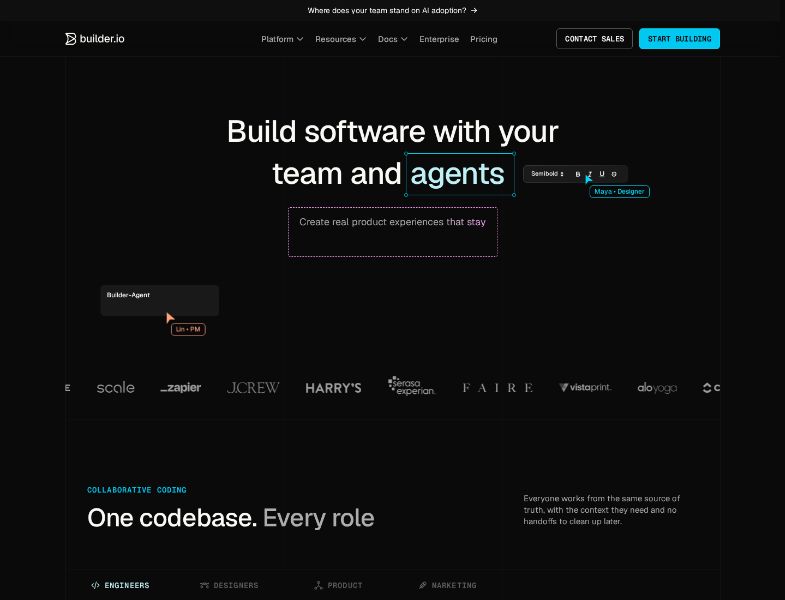
Builder.io is a visual development platform for product, design, marketing, and engineering teams that already have a codebase. Its Fusion product is a visual IDE that generates and edits production code inside your repo. Its Publish product is a visual / agentic CMS that lets content teams create, test, and publish pages on top of that stack.
Willo is an AI business builder. You describe an idea, and Willo assembles an AI team that researches the market, creates a brand, ships a website, sets up payments, and keeps working on content, marketing, and operations.
If you already have engineers, a design system, and a live product, Builder.io is often the better fit. If you need a business to exist in the first place — site, marketing, offer, payments, email, and ongoing work — Willo is built for that job.
Quick decision table
| If you need… | Better starting point |
|---|---|
| Visual editing inside an existing React, Next.js, Vue, Svelte, or Angular app | Builder.io |
| Marketers publishing landing pages without filing a ticket | Builder.io Publish |
| Figma-to-code that follows your design system and opens a pull request | Builder.io Fusion |
| A/B tests, personalization, and localization on a production site | Builder.io |
| Enterprise SSO, RBAC, SOC 2 Type 2, and Git-based review | Builder.io |
| An idea turned into a live website, brand, and roadmap on day one | Willo |
| Stripe checkout, email list, analytics, and weekly growth work | Willo |
| A non-technical founder, operator, or agency launching without a repo | Willo |
| Multiple small businesses from one credit pool | Willo |
What is Builder.io?
Builder.io, founded in 2018 and based in San Francisco, calls itself a visual development platform for cross-functional teams. The current product is split into two spaces you can use separately or together:
- Fusion — a visual IDE for generating, editing, and shipping code in your existing repository.
- Publish — an agentic / visual CMS for creating pages, campaigns, structured content, experiments, and personalized experiences.
Public customer logos on Builder.io's site include Everlane, Scale AI, Zapier, J.Crew, Harry's, Experian, Faire, Vistaprint, Alo Yoga, ClickUp, Panasonic, and others. Company case studies describe marketers launching pages without waiting on engineering, and engineering teams reclaiming time that used to go to content tickets.
How Fusion works
According to Builder's Fusion docs and getting-started guide, the workflow is:
- Connect a GitHub, GitLab, Bitbucket, or Azure DevOps repository.
- Optionally add a design-system repo so generated UI follows your components, tokens, and conventions.
- Prompt the AI, import a Figma design, or edit visually. Fusion writes real code.
- Send a pull request. Engineers review and merge through the team's existing process.
Fusion also works with Cursor, Claude Code, and Codex via MCP, so engineers can keep coding in their editor while designers, PMs, and marketers polish the same branch in Builder. Supported frontend frameworks listed on the Fusion page include React, Next.js, Vue, Svelte, and Angular.
How Publish works
Publish connects to an existing site or app. You decide what Builder manages:
- Visual Pages — everything between the header and footer.
- Visual Sections — documented as Enterprise-only; a portion of a page, with targeting and scheduling.
- Structured Data — reusable content fetched anywhere in the app.
Content teams can import from Figma or the web, iterate with Visual Editor AI, and publish using registered custom components. Builder says it passes content to your codebase rather than hosting the site for you. You keep hosting, SEO setup, analytics, and core product flows.
Publish also advertises experimentation, personalization, localization, roles, approvals, environments, and audit trails. Builder states it is SOC 2 Type 2 compliant.
What is Willo?
Willo is an AI business builder for founders, operators, solopreneurs, agencies, and local businesses. You describe a business or idea. Willo stands up an AI team and the infrastructure to run it.
On day one, Willo agents ship:
- Market, competitor, and audience research
- A brand guide (voice, palette, positioning)
- A living roadmap with milestones and tasks
- A website deployed to your own GitHub repo plus hosting
- Stripe prepared for revenue
- Strategic decisions logged in an auditable Decision Register
The built-in team on the homepage is seven agents: CEO, Product, Research, Marketing, Content, Support, and Finance. Chat is always free. Credits are spent on work that ships — coding sessions, deploys, and background builds.
Paid plans add the Autonomous Growth Engine, Stripe Connect revenue tools, email sending and contacts, and built-in analytics. Higher plans add custom domains, team invites, business transfer, Shopify integration, and more backend compute.
Willo is explicit about what it is not. It is not a get-rich-quick product, a paid-ads manager, a legal advisor, or a guarantee of traffic or revenue. You still approve strategy, bring domain knowledge, and review output.
Builder.io vs Willo: feature-by-feature comparison
| Area | Builder.io | Willo |
|---|---|---|
| Primary job | Visual development and content publishing on an existing stack | Turn an idea into a working business and keep operating it |
| Starting point | Your repo, design system, and live site or app | A description of a business or idea |
| Website / app building | Fusion generates and edits production UI in your codebase; Publish edits pages and sections visually | AI builds and deploys a website (and, on paid plans, apps/software) to GitHub + hosting |
| Backend | You bring your own backend, APIs, and hosting | All plans provision a backend with database, auth, APIs, and cloud storage |
| Code ownership | Changes land in your Git repo via branches and pull requests | Website is auto-deployed to your GitHub repo; you can cancel and keep what was built |
| Design control | Visual editor plus Figma import; Enterprise Design System Intelligence maps Figma components to code | Brand guide, Visual Builder, on-page text editing, Brand panel, Assets library |
| CMS / content | Full visual CMS: models, entries, localization, targeting, scheduling, reusable content | Agents write site copy, blog posts, lead magnets, and newsletters; not a headless CMS for an existing app |
| AI agents | Builder Agent for code and content tasks; Slack and Jira agents on Team+; Quality Review Agent on Team+ | Seven business agents plus scheduled automations and a weekly Growth Engine on paid plans |
| Marketing | Page building, experiments, personalization, localization | Research, positioning, content, outreach drafts, email capture, weekly growth loops |
| Payments / commerce | Connects to existing commerce data and storefronts; Shopify-installed app is documented | Stripe Connect built in; products and checkout pages created by agents; Shopify storefronts on Builder plan+ |
| Analytics | Visual Views and bandwidth usage for Publish; in-app usage metrics on Team+ | Built-in analytics on paid plans; weekly planning uses traffic and revenue data |
| Collaboration | Real-time multiplayer; Team plan adds roles, commenting, peer review, password-protected previews | Team invites and business transfer on Builder plan+; client handoff to another Willo account |
| Integrations | Git providers, Figma, VS Code, MCP servers, Slack, Jira, Linear, commerce/CMS data, webhooks/APIs | Stripe, GitHub, Mailchimp, Gmail, Shopify, QuickBooks, Notion, HubSpot, Calendly, Airtable, Zapier, plus any API |
| Security / enterprise | SOC 2 Type 2; SSO, RBAC, privacy mode, private Git connectivity on Enterprise | Willo states business data is not shared with other customers; see Willo's own security/privacy pages for current detail |
| Hosting | You host the site or app; Builder delivers content and generated code | Cloud hosting included; custom domains on Builder plan+ |
AI capabilities
Builder.io's AI is aimed at product work: generate a component from Figma, prototype a flow, implement a PRD, edit copy in context, or create page variants. Agent credits meter that usage. Estimated examples in Builder docs include about 16 credits to generate a carousel from Figma into a working demo, 18 credits for a four-step onboarding prototype, and 37 credits to implement a settings page from a PRD.
Willo's AI is aimed at operating a business. Agents research competitors, lock positioning, ship the site, draft campaigns, and queue work for your approval. The Growth Engine on paid plans runs weekly plan → execute → reflect cycles using real traffic and revenue data.
Website, app, and code export
Builder.io does not replace your application. Fusion writes into the repo you already have. Publish injects visually managed content into pages you already host. That is a strength if you have a production stack. It is a blocker if you do not.
Willo provisions the first version for you: GitHub repo, hosted site, brand, and roadmap. All plans includes a dedicated backend so the product can be more than a marketing site.
Ecommerce, payments, and growth
Builder.io is used on commerce sites — customer stories include Everlane, Harry's, Fabletics, and Black Rifle Coffee — but it manages experiences on top of your store, not the entire revenue operation.
Willo includes Stripe Connect on paid plans, creates products and checkout pages, and states it takes no platform cut of revenue. Shopify integration is on the Builder plan and above. Email sending, contacts, and scheduled marketing tasks are part of the paid growth toolkit.
Collaboration and handoff
Builder.io is built for teams that already have roles. Free and Pro are admin-only. Team adds Admin, Developer, Designer, and Editor roles, commenting, peer reviews, and password-protected previews. Enterprise adds custom RBAC and SSO.
Willo has teammate invites and business transfer to a client's own account. That is useful for agencies and bigger teams.
Pricing and cost comparison
Confirm updated pricing on the official pages before you buy.
Builder.io
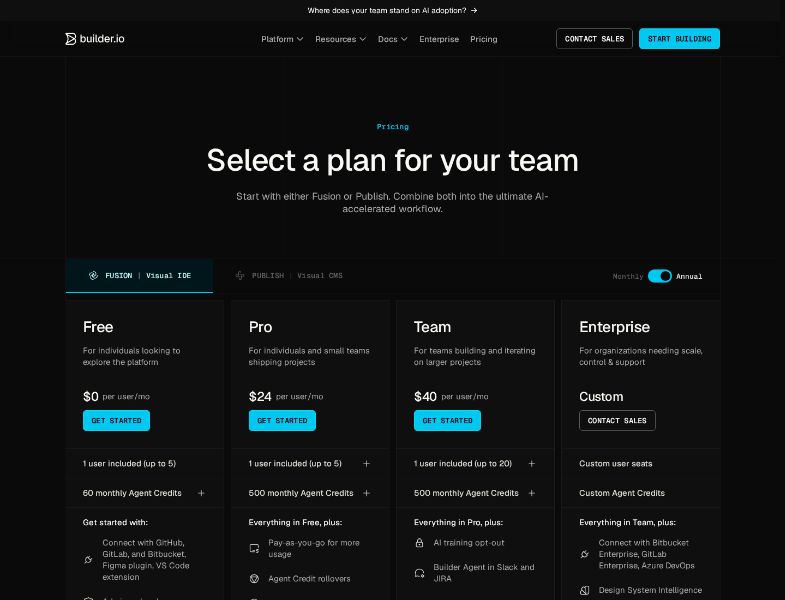
Builder's pricing page lets you start with Fusion or Publish. Plans share the same names.
Fusion (Visual IDE), as listed on the pricing page:
| Plan | Listed price | Users | Agent credits | Notes from the official page |
|---|---|---|---|---|
| Free | $0 per user/mo | 1 included, max 5 | 15 daily / 60 monthly | GitHub, GitLab, Bitbucket, Figma plugin, VS Code extension; admin-only; community forum |
| Pro | $24 per user/mo | 1 included, max 5 | 500 monthly | Pay-as-you-go usage, credit rollover, 30-day activity history, built-in MCP servers, standard support |
| Team | $40 per user/mo | 1 included, max 20 | 500 monthly | AI training opt-out, Slack and Jira agents, extra roles, commenting, peer reviews, custom MCP, password-protected previews, usage metrics, priority support |
| Enterprise | Custom | Custom | Custom | Azure DevOps / enterprise Git, Design System Intelligence, privacy mode, RBAC, SSO, SLAs, onboarding |
The page defaulted to Annual, and the cards showed $24 (Pro) and $40 (Team) per user/month. Builder's February 2026 Team plan post said Team was $40 per user/month billed annually ($480/year) or $50 per user/month billed monthly. That implies the $24 / $40 figures on the annual toggle are discounted annual rates, not the month-to-month price. Confirm the toggle before you quote a number.
Extra Fusion seats can be purchased on Pro and Team. Extra Agent credits on Pro and Team are $25 per 500 as a monthly add-on. One-off top-ups are also available in packs starting at $250, documented as about 20% more expensive than subscription credits. Unused paid credits can roll over up to 2× the monthly amount. Additional credit purchases are not refundable.
Publish (Visual CMS) uses the same plan names, but billing is not only seats and credits. Subscription docs say a Publish space also meters volume — visual views and bandwidth. A visual view is a page view that uses Builder visual content. Public dollar amounts for Publish volume were not listed as a simple price card in the same way Fusion seats are. If you are buying Publish for a live site, confirm view and bandwidth limits with Builder before you compare monthly cost.
Credit-allocation nuance: Fusion Pro/Team includes 500 credits per user per month. Publish Pro/Team includes 500 credits per space, shared by everyone in that space, according to the Agent credits docs.
Docs vs pricing-page mismatch: the pricing page lists Free as 15 daily / 60 monthly credits. The Agent credits FAQ still mentions a Free daily reset of 25 and a monthly cap of 75 in one section.
Subscriptions are per space, not per organization. Fusion spaces and Publish spaces are billed separately. Using both means two subscriptions.
Willo
From Willo's pricing page:
| Plan | Price | Credits | Businesses | Highlights |
|---|---|---|---|---|
| Free | $0 | 40 one-time | Up to 2 | Unlimited chat, AI website, backend, cloud hosting, no credit card |
| Starter | $25/month | 150/mo | Up to 3 | App/software building, backend, Growth Engine, Stripe Connect, email, analytics |
| Builder | $49/month | 300/mo | Up to 6 | Custom domains, 1-month credit rollover, team invites, Shopify |
| Growth | $99/month | 600/mo | Up to 12 | 2× Builder credits, custom agents (coming soon), early beta, more compute |
| Scale | $199/month | 1,300/mo | Up to 25 | Best credit rate, 15× backend compute, priority support |
Chat is always free. Credits are a shared pool across every business on the account. Extra credit packs start at 50 credits for $11 ($0.22/credit) and go down to $0.18/credit at 1,000 credits.
How the bills actually compare
These products do not price the same unit of work.
- Builder.io charges per user, per space, plus Agent credits, and — for Publish — visual views and bandwidth. A 5-person Fusion Pro space at the listed $24/user/month is $120/month before extra credits. A 10-person Team space at the listed $40/user/month is $400/month, and you still need engineers, hosting, and (if you use it) a separate Publish space.
- Willo charges one flat plan for the account. Several businesses share one credit pool. A solo operator on Starter is $25/month. A founder running a few projects on Builder is $49/month.
Ease of use and onboarding
Builder.io is easy for the person editing a page after a developer has integrated the SDK, registered components, and connected Git. Getting to that point is a technical project. Fusion onboarding is: connect a repo, configure the project, optionally index a design system, then prompt or edit visually. Publish onboarding is: import a design, iterate with AI, then integrate Pages and custom components with Builder Devtools.
G2 reviewers often praise the drag-and-drop editor once it is live. Several also mention a learning curve, incomplete or outdated docs, and a tough first integration. That matches the product: Builder.io is powerful inside a real codebase, and the codebase is the hard part.
Willo is built for someone who can describe a business in plain language. There is no repo to bring. Day-one output is a site, brand, and roadmap. You still need to show up regularly — Willo asks for roughly 15–30 minutes of review and approval every day — but you do not need to wire hosting, auth, or Stripe yourself.
If you are technical and already shipping a product, Builder.io's learning curve is the cost of staying in your stack. If you are not technical, that curve is the product.
Who is Builder.io best for?
- Product, design, and engineering teams with an existing web app or marketing site
- Marketing and content teams that need to publish on-brand pages without waiting on every ticket
- Organizations that already have a design system and want Figma-to-code that respects it
- Mid-market and enterprise teams that need roles, previews, SSO, and SOC 2
- Commerce and multi-brand companies that want experiments and personalization on a site they already host
Who is Willo best for?
- Founders and operators who have an idea but not a product team
- Solopreneurs and local businesses that need a live site, payments, and follow-up work
- Agencies that want to stand up a client business and later transfer it
- People who want research, marketing, brand, website, email, and Stripe in one place
- Users who prefer a flat monthly plan and unlimited chat instead of per-seat CMS pricing
Pros and cons
Builder.io pros
- Works in your real repo and design system, not a disconnected sandbox
- Strong visual CMS for marketers once developers have integrated it
- Figma import, visual editing, and PR-based shipping in one workflow
- Experimentation, personalization, and localization for live sites
- Enterprise-ready options: SOC 2 Type 2, SSO, RBAC, private Git connectivity
- Named customers and a mature docs/forum/support structure
Builder.io cons
- Assumes you already have a codebase, hosting, and (usually) developers
- Per-user, per-space pricing adds up; Fusion and Publish can be two bills
- Publish also meters visual views and bandwidth
- Free and Pro are admin-only; real collaboration starts at Team
- Several G2 reviewers reported a learning curve, doc gaps, or slow support
- Does not research a market, create a company, or run ongoing business operations
Willo pros
- Goes from idea to live business infrastructure without a preexisting repo
- Built-in agents for research, product, marketing, content, support, and finance
- Stripe Connect, email, analytics, and a weekly Growth Engine on paid plans
- One account-level plan and shared credits across businesses
- Unlimited free chat; you pay for work that ships
- Cancel-and-keep model: GitHub repo, site, and assets stay with you
Willo cons
- Not a headless CMS or visual IDE for an enterprise design system
- No equivalent to Builder.io's targeting, localization, or section-level experiments
- You still have to steer strategy and review output; it is not passive income
When to choose Builder.io
Choose Builder.io when the website or app already exists and the bottleneck is who can change it.
Typical cases:
- Engineering is buried in landing-page tickets
- Designers want Figma to become real components, not a PDF
- Marketing needs A/B tests and localized campaigns on the production site
- Security and legal need SSO, audit trails, and a SOC 2 report
- You are happy to keep hosting, CI, and the backend you already have
In those cases Willo would be the wrong layer. You do not need another business. You need a safer way for more people to ship inside the one you have.
When to choose Willo
Typical cases:
- You can describe the offer, but you cannot stand up the site, payments, and ops stack
- You want agents to keep drafting content, improving the site, and planning the week
- You are an agency spinning up a client property you may later transfer
- You want one subscription instead of a CMS, a host, a page builder, and a freelancer roster
Frequently asked questions
Is Willo a Builder.io alternative?
Only for a specific search. People looking for a "Builder.io alternative" sometimes want any AI tool that builds websites. Willo can build and host a site from a prompt, so it shows up in that mental category. It does not replace Builder Fusion or Publish on an existing enterprise stack.
Can Builder.io start a business from scratch?
Not in the way Willo does. Fusion can scaffold UI and even help you start from a prompt, but you still need a repo, hosting, payments, and someone to run the company. Publish needs a site to connect to.
Can I use both?
Yes, in sequence more than in parallel. Willo can get a business live. If that product later becomes a custom app with an in-house team, Builder.io could become the visual layer on that codebase. Most readers will need one or the other first.
Does Builder.io host my website?
Builder's Publish docs say Builder passes content to your codebase. You keep hosting. Fusion ships code through your Git workflow. Willo includes cloud hosting and can connect a custom domain on paid plans.
How do independent reviewers rate Builder.io?
On G2, Builder.io was listed at 4.6 out of 5 from 26 reviews (84% five-star, 11% four-star, 3% one-star). That is a small sample. Praise often covers the visual editor and letting marketers move without engineers. Complaints include onboarding difficulty, documentation, and occasional support or billing friction. Treat individual reviews as anecdotal.
Which is cheaper?
For one non-technical person launching a business, Willo is simpler and usually less expensive. For a 15-person product org that already pays engineers and hosts a Next.js site, Builder.io's seat price is a tooling cost, not a replacement for Willo's full-business scope.
Conclusion
Builder.io is a strong choice when you already have a product team and a codebase. Fusion keeps design and engineering in the same repo. Publish lets content teams ship pages, tests, and campaigns with guardrails.
Willo is a better choice when you need the business itself: research, marketing, brand, website, payments, email, and an AI team that keeps working after launch.
If you have an idea and no stack behind it, start free on Willo — no credit card required — and see what the agents ship in the first hour. If you already have a production app and need a visual layer on top of it, start with Builder.io instead.