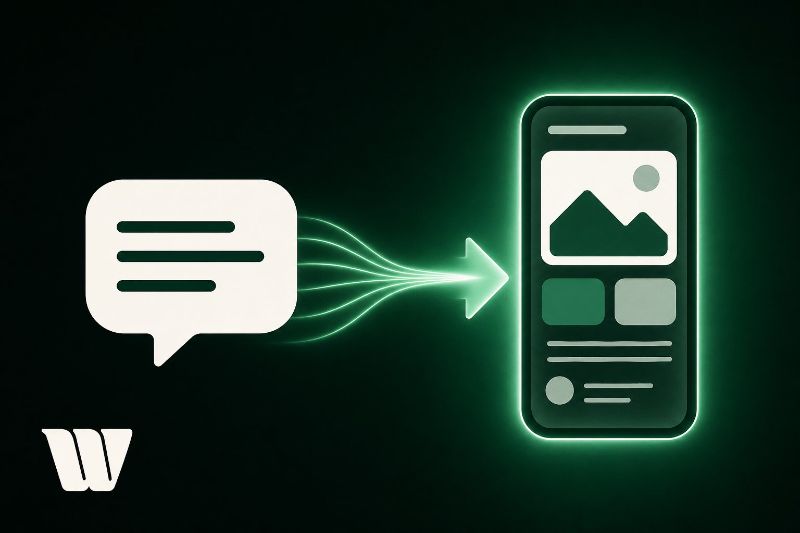
Prompt-to-app technology lets you describe software in plain English and receive functional, deployable code without writing a single line yourself. You submit a natural language prompt, and an AI pipeline breaks it down into structured intent, then automatically generates UI components, data models, and business logic. The system abstracts traditional development complexity into executable, interconnected outputs. Whether you're technical or not, you can build real applications this way — and there's much more to uncover ahead.
Key Takeaways
- Prompt-to-app technology converts plain-language descriptions into functional software by automatically generating code, architecture, and application assets.
- An NLP pipeline processes submitted prompts, breaking input into structured intent and entities that map to app components like UI and logic.
- Generated applications can include productivity tools, e-commerce sites, social networks, and games, depending on prompt precision and structure.
- Current limitations include scalability issues, third-party API integration challenges, and gaps in accessibility compliance requiring manual developer intervention.
- The technology democratizes software creation, enabling non-developers to build production-ready applications and accelerating prototyping cycles significantly.
What Is Prompt-To-App Technology?
Prompt-to-app technology is an AI-driven development paradigm that converts natural language descriptions into functional software applications. You provide a plain-language prompt describing your desired functionality, and the system generates corresponding code, architecture, and assets automatically.
The underlying models interpret your intent, map it to appropriate frameworks, and produce deployable outputs without requiring you to write manual code. This approach abstracts traditional development complexity by translating your requirements directly into structured components.
The technology handles both user interface construction and user experience design simultaneously, generating layouts, navigation flows, and interactive elements based on your specifications. You're fundamentally communicating with an intelligent compiler that understands contextual intent rather than strict syntax.
This fundamentally shifts how you approach software creation, making application development accessible to both technical and non-technical users alike.
How Prompt-To-App Actually Turns Your Words Into a Real App
When you submit your prompt, the system runs it through a natural language processing (NLP) pipeline that breaks down your input into structured intent, entities, and relationships.
It then maps those parsed elements to corresponding app components—UI layouts, logic functions, data models, and API connections—assembling them into a coherent architecture.
The result is a functional, deployable application built directly from the language patterns you provided.
Parsing Your Natural Language
Ambiguous phrasing triggers confidence scoring, prompting clarification requests when intent falls below a defined threshold.
Every parsed element gets tagged with a priority weight, ensuring the generation engine builds core functionality first.
Your words effectively become a structured schema before a single line of code gets written.
Generating Functional App Components
Once the structured schema locks in, the generation engine begins assembling your app's discrete functional components in a deliberate sequence.
Each module renders independently before user interface integration binds them into a cohesive, operational whole. App component design follows strict dependency mapping, ensuring logic layers precede presentation layers.
The engine constructs components in this order:
- Data models — defining your entities, relationships, and validation constraints
- Business logic modules — encoding rules, calculations, and conditional workflows
- UI components — rendering buttons, forms, navigation bars, and interactive elements
- Integration connectors — wiring APIs, databases, and authentication services together
You're not receiving a static template.
You're receiving executable, interconnected components built specifically around your prompt's intent, ready for immediate deployment or iterative refinement.
The Best Prompt-To-App Tools You Can Use Today
Several prompt-to-app platforms have emerged as clear frontrunners, each offering distinct capabilities that suit different use cases and technical requirements.
You'll find tools like Bolt.new, Lovable, and Cursor positioned at different points on the spectrum between beginner accessibility and advanced developer control.
Comparing these options across key metrics—speed, code quality, supported frameworks, and pricing—helps you identify which tool aligns with your specific project demands.
Top Tools Available Now
The prompt-to-app landscape has matured quickly, and a handful of tools now stand out as genuinely capable platforms worth your attention. Each addresses distinct design considerations, coding alternatives, and platform compatibility requirements while responding to current market trends.
- Bolt.new – Delivers full-stack applications directly in your browser, eliminating integration challenges between development environments.
- Lovable – Prioritizes user experience through refined user feedback loops, translating plain descriptions into polished React applications.
- V0 by Vercel – Generates production-ready UI components with precise design considerations baked into every output.
- Cursor – Functions as an AI-powered IDE that serves as a genuine coding alternative for developers wanting granular control.
Future predictions suggest these platforms will deepen their capabilities considerably, making today's limitations temporary constraints rather than permanent boundaries.
Comparing Popular Options
Choosing the right prompt-to-app tool depends on your specific use case, technical background, and deployment requirements.
Bubble excels at complex, database-driven applications but demands a steeper learning curve.
Glide converts spreadsheets into mobile apps rapidly, making it ideal for data-centric workflows with minimal setup.
Softr bridges Airtable and web apps efficiently, prioritizing clean user experience without heavy configuration.
Draftbit suits developers wanting more granular React Native control.
Adalo emphasizes rapid prototyping with built-in user feedback mechanisms, letting you iterate quickly based on real usage data.
GPT-Engineer and similar AI-native tools generate full codebases from prompts, offering maximum flexibility but requiring developer oversight post-generation.
Evaluate each platform against your performance benchmarks, scalability needs, and how effectively each supports continuous user feedback loops throughout your development cycle.
What Kinds of Apps Can You Actually Build This Way?
When people first encounter prompt-to-app tools, they often assume the output is limited to simple, toy-grade utilities—but that assumption undersells what these systems can produce.
You can build across virtually every major software category:
- Productivity tools and educational platforms with structured workflows, user authentication, and data persistence
- E-commerce sites and health trackers featuring dashboards, payment logic, and real-time data visualization
- Social networks and lifestyle apps with user profiles, content feeds, and notification systems
- Game apps and travel planners with interactive interfaces, dynamic content rendering, and API integrations
The complexity ceiling depends on how precisely you architect your prompts.
Vague inputs produce shallow results.
Detailed, structured prompts that specify data models, user flows, and feature logic consistently yield deployable, functional applications across these categories.
In Willo, for example, describing a software product gets you sign-up and sign-in that work, the app's screens, and the database behind them. What Willo does lists the rest, and Your first session walks from the first description to a live build, which usually takes 5 to 15 minutes.
How to Write Prompts That Get Better App Results
Structure your prompt around three elements: the core function, the user's action, and the expected output. Specify data types, user roles, and edge cases upfront.
Prompt refinement works iteratively—submit a functional baseline first, then layer in constraints through follow-up prompts.
Avoid vague verbs like "handle" or "manage." Use precise alternatives: "validate," "store," "retrieve," or "display." The more operationally specific your language, the more deployable your result.
The Real Limitations of Prompt-To-App Technology Right Now
Prompt-to-app platforms deliver working prototypes fast, but they hit predictable walls once your requirements move beyond CRUD operations and simple UI logic.
User limitations and technology constraints become visible quickly when you're building production-grade systems.
Current feature restrictions and integration challenges include:
- Scalability issues: Generated apps rarely handle concurrent users, database indexing, or load balancing natively.
- Integration challenges: Connecting third-party APIs, OAuth flows, and webhooks requires manual intervention beyond what prompts can specify.
- User experience gaps: Complex conditional navigation, accessibility compliance, and responsive edge cases get approximated, not engineered.
- Feature restrictions: Real-time functionality, background jobs, and custom authentication logic typically exceed what the generation layer can reliably produce.
You'll need traditional development skills to bridge these gaps.
Why Prompt-To-App Is Changing Software Development for Good
Despite its current limitations, prompt-to-app technology is restructuring the software development lifecycle in ways that can't be reversed.
You're witnessing a fundamental shift in how software gets built, tested, and deployed. Coding efficiency improves greatly when you eliminate repetitive boilerplate tasks and accelerate prototyping cycles. Developers now spend less time writing foundational code and more time solving complex architectural problems.
The user experience design process also benefits directly. You can iterate on interface concepts within minutes rather than days, validating ideas before committing engineering resources.
This compression of the development timeline changes how teams prioritize, plan, and execute.
Most notably, prompt-to-app democratizes software creation. Technical barriers that previously excluded non-developers are dissolving, expanding who can participate in building functional, production-ready applications.
Frequently Asked Questions
Do I Need to Pay a Subscription Fee to Use Prompt-To-App Tools?
It depends on the tool you're using. Most prompt-to-app platforms offer varied pricing tiers, including free plans with limitations. However, advanced features typically require subscription models, so you'll need to review each tool's specific pricing structure carefully.
Can I Transfer Ownership of an App Built With Prompt-To-App Platforms?
Yes, you can transfer app ownership on most prompt-to-app platforms. The transfer process typically requires you to navigate account settings, assign a new owner, and confirm the handover, ensuring complete app ownership rights are passed successfully.
Are Apps Created Through Prompt-To-App Technology Secure From Data Breaches?
Security isn't guaranteed, but you can strengthen your app by ensuring the platform implements data encryption and robust user authentication. Always review the provider's security protocols, compliance certifications, and vulnerability testing practices before deploying sensitive applications.
How Long Does It Typically Take to Generate a Complete Working App?
You'll typically generate a complete working app in seconds to minutes, though time estimation varies based on complexity. Simple app development takes under a minute, while feature-rich applications may require several minutes of processing.
Can Prompt-To-App Tools Integrate With My Existing Business Software Systems?
Yes, you can integrate prompt-to-app tools with your existing business software, though you'll encounter integration challenges around software compatibility. Most platforms support APIs, webhooks, and pre-built connectors to streamline connections with your current systems.
Conclusion
You've now seen how prompt-to-app technology converts natural language into functional software through structured AI pipelines. You understand which tools to use, what application types you can build, and how to craft precise prompts that produce better outputs. You also know the current technical constraints that limit what's achievable. This technology won't replace disciplined engineering entirely, but it's fundamentally restructuring how software gets built, compressed, and deployed across development workflows.