
FlutterFlow is a visual development platform for Flutter apps. The homepage leads with “Build Better. Launch Faster”: design UI, add Action Flow logic, connect Firebase or Supabase, and deploy to mobile, web, and desktop. Paid plans let you download source and (from Growth) push to GitHub.
That is a different job from an AI company-in-a-box. FlutterFlow is strongest when you need a real Flutter application and you are willing to learn a visual (often low-code) editor. It is a weaker match if you mainly need research, a brand, a marketing site, Stripe, and agents that keep operating the business after publish.
Curious how it stacks up against Willo? Check out our comparison between FlutterFlow and Willo.
What is FlutterFlow?
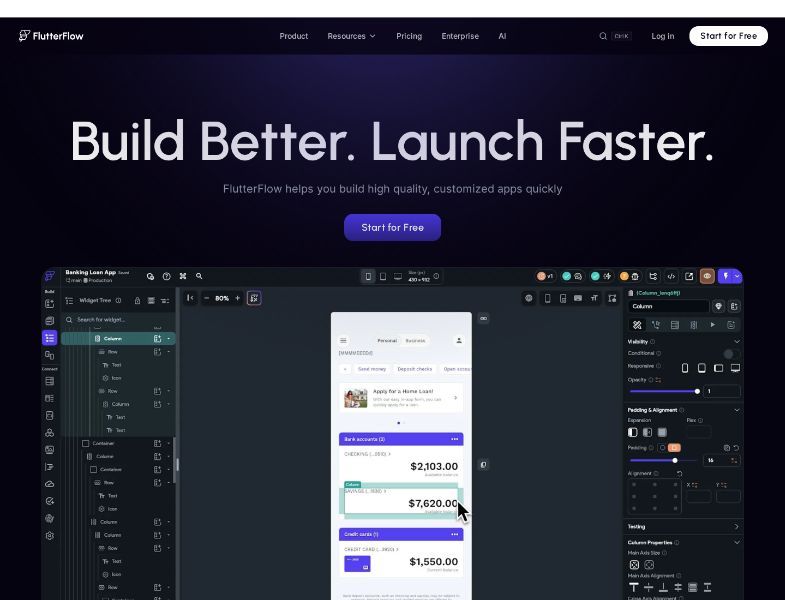
Official docs: FlutterFlow is a visual development environment that lets you build mobile, web, and desktop apps quickly without sacrificing quality or features. The 2026 homepage claims over 3.3 million users and shows logos such as GM, Google, Amazon, IBM, Microsoft, Capital One, Wendy's, Salesforce, and FIS. Treat the user count as a company claim.
The product is not a website builder. It is closer to a Flutter IDE with a canvas:
- Visual UI (200+ elements)
- Action Flow logic
- Firebase / Supabase / REST
- Test Mode and (paid) Test Pilot
- Branching and comments
- Store and web deploy
- Code export on paid plans
FlutterFlow Designer is a related AI canvas: prompt to multi-screen UI, refine on an infinite board, download for macOS/Windows or open in the browser. It is positioned as design-to-code, not as a business operator.
How FlutterFlow works
- Create a project in the builder (Free allows 2 projects).
- Design screens with widgets, a design system, or Figma imports (some Figma features are plan-gated).
- Add logic in the Action Flow Editor; use custom code when the visual model is not enough.
- Connect data. Firebase, Supabase, or API endpoints (Free: up to 2 endpoints).
- Test in Test Mode; paid plans add Test Pilot, local device testing, and (higher tiers) automated tests.
- Deploy. Web on Free (watermark, subdomain limits). Custom domain, APK, and one-click store deployment start at Basic.
- Export if you paid. Download code / APK on Basic. Push to GitHub on Growth. CLI export is documented for Business.
You still configure Apple and Google developer accounts, and you still pay Firebase/Supabase if you use them.
Key features
Visual UI and Designer
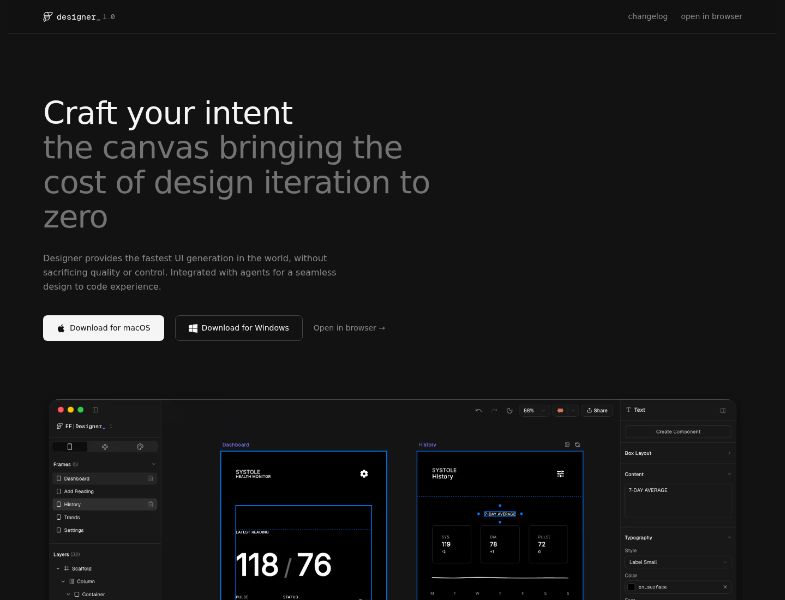
Homepage: 200+ pre-designed UI elements, granular widget properties, custom actions/widgets, design systems, Figma theme import. Designer is the AI-generation surface for UI: “Craft your intent… cost of design iteration to zero.”
Logic and custom code
Action Flow Editor, state management, custom code expressions. Official homepage: custom actions and widgets so “anything” is possible to build. G2 reviewers often say complex logic still wants Dart.
Data and integrations
Firebase and Supabase on all plans (including Free). REST APIs. Payments, maps, ads, push notifications appear on the pricing matrix as advanced app features. AI Agents: 0 on Free, 1 on Basic, unlimited on Growth/Business.
Test and deploy
Test Mode on the homepage. Test Pilot from Basic. Local run / emulator and one-click store deployment are paid. Web deploy exists on Free with FlutterFlow watermark until you pay, up to 2 free subdomains on Free vs 20 on paid, and 1 free custom domain on paid (more purchasable).
Code ownership
This is the feature people compare against Bubble-style lock-in.
- Homepage: “Export your code with the click of a button. No vendor lock-in.”
- Pricing: Code Download and APK Download on Basic+.
- Push to GitHub on Growth+.
- Docs (toolbar): View Code; Connect GitHub, Download Code, and Download APK require a paid plan.
- CLI flutterflow export-code is documented for exporting a codebase (Business lists CLI on the public pricing page).
GitHub workflow in docs: FlutterFlow pushes to a flutterflow branch; you keep custom code on develop and merge with pull requests so generated updates do not blindly overwrite you.
Collaboration
Growth: real-time collab for 2 users, 2 open branches. Business: up to 5 editors, 5 branches, purchasable single-project collaborator add-ons. Free/Basic: 1 editor.
What you do not get
- An AI team that researches the market and runs the company
- A Stripe-connected business with weekly Growth Engine as the default product
- Unlimited AI generation on Free (5 lifetime requests)
Pricing and plans
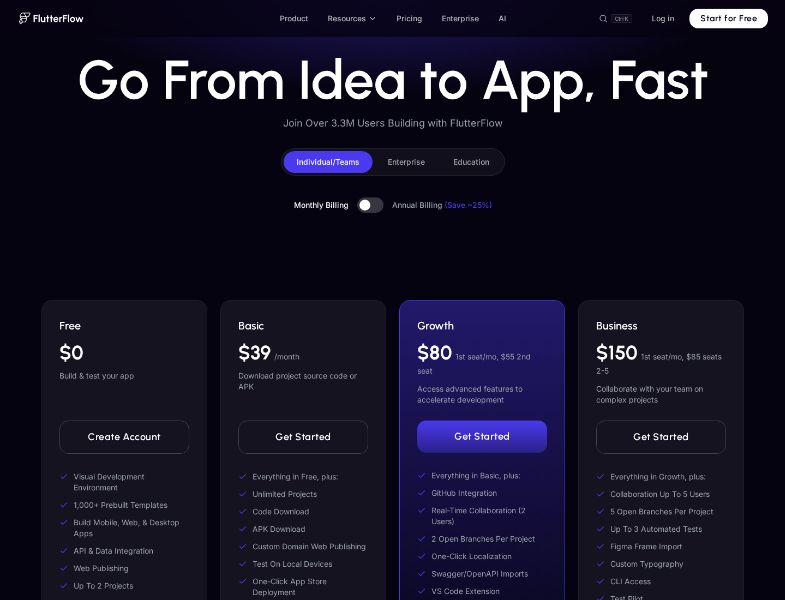
| Plan | Monthly USD | Highlights |
|---|---|---|
| Free | $0 | 2 projects; 5 AI requests lifetime; 10 Lite credits; web publish with watermark |
| Basic | $39/month | Unlimited projects; code + APK download; custom domain; store deploy; 50 AI/mo; 100 Lite/mo; 1 AI Agent |
| Growth | $80 1st seat / mo, $55 2nd | GitHub; 2 editors; 2 branches; 200 AI/mo; 200 Lite/seat; unlimited AI Agents |
| Business | $150 1st seat / mo, $85 seats 2–5 | 5 editors; 5 branches; CLI; Figma frames; 500 AI/mo; 400 Lite/seat |
| Enterprise | Custom | Custom project/AI limits |
Apple Developer, Google Play, Firebase, and Supabase bills are separate.
User feedback and reputation
G2 (August 2026): 4.5 / 5 from 30 reviews. Star mix: 73% five-star, 20% four-star, 3% three-star, 3% one-star. That is a small sample — do not treat it as a census
- Liked: powerful interface, rapid development, ease of use for people who get it, ability to add custom Dart and export.
- Disliked: slow test builds / previewer, still needs coding (more low-code than no-code), backend connection friction, learning curve.
Treat those as anecdotal clusters. This review does not cite Capterra or Trustpilot; those pages were not independently verified in this research pass.
Pros and cons
Pros
- Real Flutter output you can download on paid plans
- Mobile + web + desktop from one project
- Firebase/Supabase and REST without standing up a custom stack first
- Designer for fast UI generation
- Store deployment path on Basic+
- Strong “speed to MVP” reputation in a small G2 set
Cons
- You still run brand, content, and growth
- Free plan is a sandbox (2 projects, no code download)
- GitHub starts at Growth, not Basic
- Learning curve and custom code for non-trivial apps (G2)
- Test/preview performance complaints (G2, small n)
- Backend and store accounts are extra cost
Limitations and challenges
- It is an app builder. Research, positioning, and weekly ops are still yours.
- “No-code” is overstated if you need custom Dart — G2 reviewers say so.
- Export is paid. Do not plan a Free-plan exit with a ZIP of source.
- GitHub is a higher tier than download.
- Designer ≠ operator. Prompt-to-UI is not prompt-to-company.
- 30 G2 reviews is not enough to generalize support quality.
Who FlutterFlow is best for
- Product teams shipping Flutter apps to stores
- Developers who want a canvas plus Dart they can keep
- Agencies already in the FlutterFlow marketplace
- Firebase/Supabase shops prototyping fast
Who may want an alternative
- You need the company operated more than a Flutter IDE
- You need a marketing site and Stripe offer, not an app
- You refuse to learn widgets and action flows
- You need Bubble-style hosted workflows without Flutter
- You want a live custom domain for ~$25/month without store deploy
Willo as an alternative
Willo is an AI business builder, not a FlutterFlow clone. You describe an idea. Agents research the market, produce a brand, deploy a site to your GitHub, prepare Stripe, and — on paid plans — run a weekly Growth Engine.
Willo is the better starting point if the missing piece is a business, not a Flutter canvas. It is the worse starting point if you need Action Flows, one-click store builds, or downloadable Dart.
Willo pricing (August 2026): Free with 40 one-time credits; Starter $25/month; Builder $49/month; Growth $99/month; Scale $199/month. Chat is free. Credits are shared across businesses. Custom domains start at Builder.
Frequently asked questions
Is FlutterFlow free? Yes, with 2 projects and no code download. Paid plans start at $39/month (Basic).
Can I export my FlutterFlow app? On Basic and above: code and APK download. GitHub from Growth. Free: no code download on the public pricing matrix.
Does FlutterFlow use AI? Yes: generation request caps, Lite credits, AI Agents (plan-gated), and Designer for UI. That is app/UI AI, not a company-operating team.
Is FlutterFlow no-code? It is visual. G2 reviewers often call it low-code once logic gets hard.
How much does FlutterFlow cost in 2026? Official monthly USD: Free $0, Basic $39, Growth $80 / $55 seats, Business $150 / $85 seats 2–5, Enterprise custom. Annual claims ~25% off — confirm live.
Does FlutterFlow replace Shopify or a website builder? No. It builds Flutter apps. You can add payments inside an app; it is not a commerce OS or a marketing CMS.
Conclusion
FlutterFlow remains a serious option when the job is Flutter software: visual UI, action flows, Firebase/Supabase, store deploy, and paid source export. It rewards people who will learn the editor (and often a little Dart). It is the wrong expectation if you wanted a prompt to replace a company.
If you are choosing a tool to build an app, FlutterFlow is a default shortlist item. If you are choosing a tool to launch and run a business, choose Willo.