
Squarespace is a mature, managed website-building platform known for polished templates, strong visual design tools, built-in hosting, and an expanding collection of business features. It can support portfolios, blogs, service-business websites, memberships, online stores, invoicing, donations, and other website-first business models.
Squarespace is easiest to recommend when the website is the main thing being built. Its Blueprint AI Builder can generate a personalized starting point, while its editor gives users direct control over pages, blocks, colors, fonts, images, products, and navigation.
The main limitations relate to scope and cost structure. Squarespace is not a general custom-app or backend platform, and several products that appear within its ecosystem, including Acuity Scheduling and Email Campaigns, require separate subscriptions. Site portability is also partial because many features depend on Squarespace's platform code.
Curious how it stacks up against Willo? Check out our comparison between Squarespace and Willo.
What is Squarespace?

Squarespace is a hosted website builder and commerce platform. It combines website design, hosting, domains, analytics, SEO tools, payments, ecommerce, memberships, blogging, invoicing, and other features within one managed ecosystem.
Its current public pages position Squarespace for:
- Creative and professional services
- Education and training
- Beauty, fitness, health, and wellness businesses
- Home services and local businesses
- Events, nonprofits, and community organizations
- Online stores and product businesses
- Creators, freelancers, bloggers, and portfolio owners
Squarespace has operated since 2003 and now offers both traditional templates and AI-assisted setup. Users do not need to manage web hosting, server updates, or SSL certificates separately.
How Squarespace works
Squarespace users generally begin in one of two ways:
- Select a professionally designed template.
- Use Blueprint AI Builder to create a personalized starting design.
With Blueprint AI, users can choose or provide a site title, brand personality, homepage structure, required pages, sections, colors, font pairings, and AI-generated imagery. Squarespace AI can also generate new text or rewrite existing copy in supported editing areas.
After choosing a starting point, the user edits the site visually. Pages are assembled from sections and content blocks, while site styles control elements such as typography, colors, spacing, and buttons. Higher plans add more advanced customization options, including CSS, code injection, premium integrations, and advanced code blocks.
Key Squarespace features
Blueprint AI Builder and Squarespace AI
Squarespace's Blueprint AI Builder helps users generate an initial site structure and visual identity. Its public page says the tool can pre-populate a site with personalized text and imagery, recommend pages and sections, and adapt the design to a chosen brand personality.
Squarespace AI also works inside supported text areas. It can draft or rewrite copy based on prompts. These tools can reduce the blank-page problem, but users should still review generated claims, service descriptions, prices, legal language, and brand messaging before publishing.

Templates and visual editing
Squarespace's template system is one of its clearest strengths. Templates provide professionally designed starting points, while the visual editor lets users adjust the layout without writing code.
This approach works well for business owners who care about presentation and want to make routine edits themselves. It can also reduce dependence on a developer for changing text, replacing images, publishing blog posts, or creating landing pages.
Core and higher plans provide more technical customization, according to Squarespace's current plan guide. These capabilities include custom CSS, JavaScript through code blocks or code injection, and premium integrations. Custom code expands what is possible, but it does not turn Squarespace into a full source-code-owned application platform.
Ecommerce and payments
Squarespace supports ecommerce across its current website plans. Its official documentation lists tools for selling physical products, services, subscriptions, digital content, and memberships.
Available capabilities vary by plan but can include:
- Unlimited products and services
- Customer accounts
- Product and service reviews
- Abandoned checkout recovery
- Local and regional shipping
- Shipping labels and carrier-calculated shipping
- Automatic discounts
- Product waitlists
- Commerce and purchase-funnel analytics
- Facebook and Instagram product synchronization
- Point-of-sale support in eligible markets
Squarespace is a reasonable option for a small or medium-sized conventional online store, particularly when design and content matter as much as the catalog. Larger or highly specialized stores should verify payment methods, shipping rules, inventory requirements, tax handling, extensions, and operational limits before committing.
Content, memberships, and subscriptions
Squarespace can publish blogs, host videos, restrict pages behind paywalls, and sell membership access. Its current plans have different digital-product transaction fees and video-storage limits.
This makes Squarespace relevant to educators, coaches, creators, publications, and communities selling recurring or one-time access to content. Users should calculate transaction fees carefully because the percentage varies substantially by plan.
Invoicing and project tools
Squarespace supports invoices and project-management tools for service businesses. Its plan documentation says users can send invoices, manage projects, and collect payments.
This can be useful for freelancers, contractors, consultants, and other businesses that sell custom services rather than fixed catalog products. Exact availability and payment fees should be checked in the target country.
Acuity Scheduling
Squarespace owns Acuity Scheduling, which can be added to a Squarespace site or used separately. Acuity supports online booking, client payments, intake forms, automated email and text reminders, coupons, packages, and integrations.
However, Acuity is not included automatically in the Squarespace website subscription. Squarespace's official billing documentation says it is a separate subscription with its own billing cycle and renewal settings.
That distinction matters for appointment-led businesses. A Squarespace website plus Acuity may form a strong service-business stack, but the total monthly cost is higher than the website-plan price alone.
Email Campaigns and mailing lists
Squarespace can collect subscribers through forms and newsletter blocks. Its Email Campaigns product adds branded emails, campaign building, send limits, and subscriber-triggered automations.
Email Campaigns is also billed separately from the website subscription. Squarespace says canceling a website does not automatically disable renewal for an existing Email Campaigns subscription.
SEO, analytics, and AI visibility
All current Squarespace plans publicly list SEO tools, basic website metrics, mobile optimization, SSL, and unlimited bandwidth. Higher plans add advanced website analytics and commerce reporting.
Squarespace's pricing comparison also lists plan-based AI Visibility prompt runs. These are intended to help businesses evaluate how they appear in AI-assisted search. They should not be interpreted as a guarantee of visibility, recommendations, rankings, traffic, or sales.
Contributors, permissions, and ownership transfer
Squarespace supports contributor permissions so owners can limit access to relevant site areas. Basic allows up to two contributors, while Core and higher plans support unlimited contributors, according to the current official plan guide.
A site owner can transfer ownership to an accepted contributor through the Permissions & Ownership panel. Squarespace says this can also transfer attached subscriptions, domains, and Acuity accounts in supported cases.
That makes Squarespace practical for freelancers or agencies building sites for clients. The client can take over the account-based site, billing, and attached products without rebuilding the website.
Squarespace pricing and plans
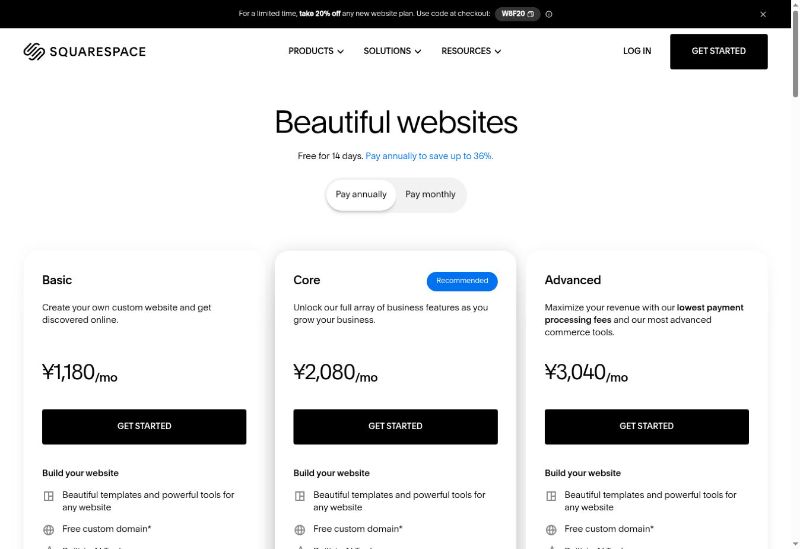
Squarespace's current global help documentation lists four website plans:
| Plan | Best suited to | Selected plan differences |
|---|---|---|
| Basic | Smaller sites, individuals, small groups, and simple online shops | Two contributors, 2% commerce transaction fee, 7% digital-product fee, 30 minutes of video storage |
| Core | More substantial business sites and teams | Unlimited contributors, no Squarespace commerce transaction fee, 5% digital-product fee, five hours of video, advanced analytics, custom code, and premium integrations |
| Plus | Growing ecommerce and content businesses | No Squarespace commerce transaction fee, 1% digital-product fee, 50 hours of video storage, and lower Squarespace Payments card rate than Basic/Core in the US documentation checked |
| Advanced | Larger stores and digital-content businesses | No commerce or digital-product transaction fee, unlimited video storage, Squarespace's lowest listed domestic-card rate, and own-carrier shipping support |
Payment-processing fees still apply. Rates vary by plan, payment method, country, currency, and payment provider.
How much does Squarespace cost?
Squarespace offers monthly and annual billing. Its public pricing page says annual billing can save up to 36%, and new annual website subscriptions include a free custom domain for one year. Squarespace offers a 14-day website trial without requiring a credit card, but it does not offer a permanent free website plan.
The pricing page dynamically localizes currency and plan presentation. During this research, it displayed annual prices in Japanese yen and showed Basic, Core, and Advanced cards rather than all four global plan names. For that reason, this article does not present those localized figures as universal Squarespace prices.
Before publishing, check the official pricing page using the audience's intended market and record:
- Exact monthly and annual prices
- Which plans are displayed
- Currency and taxes
- Payment-processing and transaction fees
- Any temporary promotion
- Separate Acuity, Email Campaigns, domain, or Google Workspace costs
Squarespace user feedback and reputation
Squarespace's Trustpilot profile displayed a score of 3.5 from 4,916 reviews as of August 2026.
Trustpilot reviews cited positive themes around intuitive site building, beginner accessibility, and helpful live-chat support. It also noted complaints involving slower or unanswered email support and some domain-transfer problems.
Overall, the independent feedback aligns with Squarespace's core proposition: many users value its design quality and relative ease of use, while some encounter limits or friction when they need deeper customization, complex integrations, billing help, or escalated support.
Squarespace pros and cons
| Pros | Cons and considerations |
|---|---|
| Professionally designed templates and strong visual presentation | No permanent free website plan |
| Blueprint AI can generate a personalized starting site | AI output still requires review and manual refinement |
| Managed hosting, SSL, bandwidth, and maintenance | Full website source code is not exportable |
| Mature ecommerce, memberships, blogging, and service-business features | Transaction and payment fees vary substantially by plan |
| Contributor permissions and ownership transfer | Acuity Scheduling and Email Campaigns require separate subscriptions |
| Built-in SEO tools, analytics, invoices, and content features | Advanced custom apps, databases, and authenticated software are outside the platform's main focus |
Squarespace limitations and challenges
Total cost can exceed the website-plan price
The website subscription does not necessarily include every Squarespace-branded product a business may need. Acuity Scheduling, Email Campaigns, Google Workspace, some domain costs, Bio Sites, and other products have separate subscriptions or charges.
This does not make Squarespace unusually expensive by itself, but buyers should compare the full operating stack rather than only the website plan.
Portability is partial
Squarespace lets users export certain content to an XML file for WordPress. It also supports exports of some products, contacts, orders, and membership information.
However, Squarespace explicitly states that not everything exports because many features rely on its JavaScript and CSS. A user can transfer ownership of the Squarespace site, but that is different from receiving a complete independent codebase that can be deployed anywhere.
Customization has boundaries
Squarespace supports custom CSS, code blocks, code injection, extensions, and selected APIs on eligible plans. Even so, its architecture remains website- and platform-centered.
Businesses needing a custom database, complex application logic, specialized user permissions, internal tools, or a standalone software product may outgrow what is sensible to build inside Squarespace.
Ecommerce fees require careful plan selection
The Basic plan has a 2% commerce transaction fee and a 7% digital-product fee, in addition to applicable payment-processing costs. Higher plans reduce or eliminate Squarespace's transaction fees.
A higher-priced plan may therefore cost less overall for a store processing meaningful sales volume. Compare projected sales and product type, not only the subscription fee.
AI does not replace business input
Blueprint AI can create a strong initial structure, but it does not know every detail of the business. Users still need to validate services, claims, brand voice, customer expectations, accessibility, legal requirements, and conversion strategy.
Who Squarespace is best for
Squarespace is likely a strong fit for:
- Creatives, photographers, designers, architects, artists, and portfolio owners
- Consultants, contractors, freelancers, and professional-service businesses
- Restaurants, salons, wellness providers, fitness businesses, and appointment-led services
- Bloggers, educators, creators, and membership businesses
- Small and medium-sized online stores that value presentation and content
- Nonprofits accepting donations and publishing campaigns
- Teams that want a visual CMS with managed hosting and contributor roles
Who may want a Squarespace alternative
Consider an alternative if you need:
- A custom app, SaaS product, dashboard, portal, or internal tool
- A user-owned GitHub repository and deployable source code
- A custom backend with a database, authentication, and APIs
- Complex automation across several business systems
- A platform that helps with ongoing research, roadmapping, content execution, support, and operational planning
- Advanced ecommerce capabilities that exceed Squarespace's shipping, payment, inventory, or integration model
Willo as an alternative to Squarespace
Willo is an AI business builder rather than a traditional visual website platform. It can build websites, apps, software, tools, ecommerce experiences, and automations by having the user describe what they need.
All Willo plans include a per-business backend with a database, authentication, and APIs. Willo also says users receive a GitHub repository and can take their code, hosted site, Stripe account, email list, content, brand assets, and decision history with them.
Willo's agents can support market research, positioning, brand development, roadmapping, site development, long-form content, email, Stripe products, analytics-informed planning, and approved Growth Engine work. Users still need to steer important decisions and review AI output.
Willo becomes more relevant when the business needs custom software, backend infrastructure, operational agents, or a build that extends beyond a hosted website.
Frequently asked questions
Is Squarespace good for beginners?
Squarespace is designed for non-technical users and offers templates, Blueprint AI, a visual editor, managed hosting, guides, and webinars. Some advanced design or commerce settings still require learning, but users do not need to manage servers or write code for a standard site.
Does Squarespace have a free plan?
No. Squarespace offers a 14-day free website trial without requiring a credit card, but its official pricing FAQ says there is no permanent free website plan.
Is Squarespace good for ecommerce?
Squarespace can be a strong choice for small and medium-sized stores, creators, subscriptions, memberships, and service sales. Stores with complex inventory, fulfillment, multi-market, or integration requirements should verify each needed capability before choosing it.
Does Squarespace charge transaction fees?
Squarespace's own commerce and digital-product transaction fees depend on the plan. Basic has a 2% commerce fee and 7% digital-product fee; higher current plans reduce or remove those fees. Payment-processing fees remain separate.
Is Acuity Scheduling included with Squarespace?
No. Acuity Scheduling is a separate subscription, although it can be connected to or embedded in a Squarespace website.
Can I export my Squarespace website?
Squarespace supports export of certain content and data, but not every feature or the complete underlying site code. Its documentation says many features rely on Squarespace's JavaScript and CSS.
Can I transfer a Squarespace website to a client?
Yes. A site owner can invite the client as a contributor and transfer ownership through the Permissions & Ownership panel. Attached subscriptions and domains can transfer with the site in supported cases.
Is Squarespace an AI business builder?
Squarespace includes Blueprint AI and AI writing tools, but its core remains website design, commerce, content, and related business services. It should not be treated as equivalent to a general AI platform that builds custom applications and runs wider operational workflows.
Conclusion
Squarespace remains a strong website platform for businesses that want polished design, a visual editing workflow, managed hosting, and built-in options for ecommerce, content, memberships, invoices, and payments. Blueprint AI makes the starting process faster without removing the user's control over design.
The platform is less suitable when the business needs custom software, independent source-code ownership, a bespoke backend, or broad AI-assisted operations. Buyers should also budget for the full Squarespace stack because scheduling, email campaigns, and other services may add separate subscriptions.