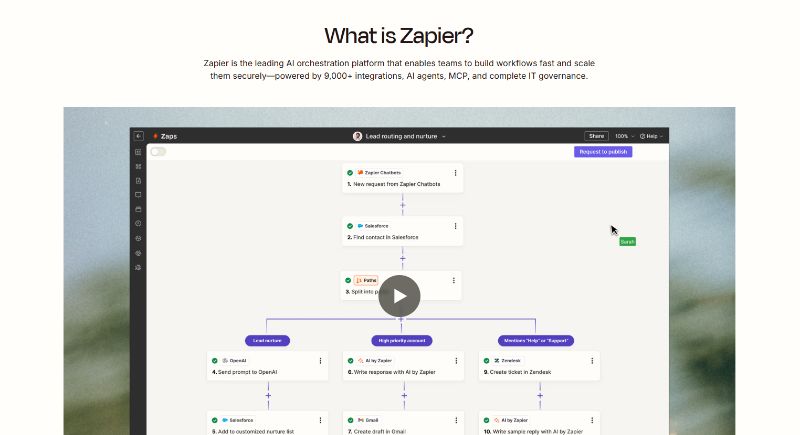
For more than a decade, Zapier has been one of the most recognizable names in the no‑code automation space. The platform began as a simple way to connect apps and automate tasks without programming, but by 2026 it had transformed into an expansive automation and AI orchestration suite that includes workflow automation (Zaps), relational databases (Tables), web forms, AI assistants and chatbots, and a visual process‑mapping tool called Canvas.
The company continues to release new features every month, such as longer runtimes for custom code steps and the ability for enterprise customers to route AI inference through their own cloud providers. This review draws on the latest product updates, user feedback and independent analyses up to April 2026 to examine whether Zapier still leads the automation market, what has improved, what shortcomings persist and how organisations can get the most value from it.
Curious how it stacks up against Willo? Check out our comparison between Zapier and Willo.
Understanding Tasks and Pricing
Zapier’s pricing still revolves around tasks, where each action performed by a Zap counts as a task. A task is consumed when a Zap successfully performs an action, such as sending an email or adding a row to a spreadsheet, but not for triggers or built‑in Filter, Formatter or Path steps. Users on the Free plan receive 100 tasks per month, while the Professional, Teams and Enterprise plans include larger allowances and can be scaled up as needed. Tasks reset monthly on most plans, though the Enterprise plan offers annual task pools, making budget management easier for large organisations.
Zapier offers a Free plan that includes unlimited Zaps, Tables and Forms, but restricts workflows to two‑step Zaps (one trigger and one action). It’s useful for experimenting with simple automations and provides access to the AI‑powered Copilot assistant. The Professional plan introduces multi‑step Zaps, access to premium apps (such as accounting or CRM systems), webhooks, AI fields and conditional logic.
Pricing for Professional starts at roughly $19.99 per month for 750 tasks, though the price increases as more tasks are required. The Teams plan mainly adds administrative features such as support for up to 25 users, shared Zaps and folders, and SAML single sign‑on. The Enterprise plan focuses on governance and scaling: unlimited users, granular permissions, annual task limits, enhanced security controls and a dedicated technical account manager. Zapier does not publish Enterprise pricing; prospective customers must contact sales.
Two add‑ons introduced in late 2025 have become central to Zapier’s AI offerings. Agents are AI teammates that can carry out multi‑step tasks across thousands of apps without coding. Pricing starts at 400 activities per month for free and begins at $33.33 per month for 1,500 activities. Chatbots let organisations embed AI‑powered chatbots on websites or portals; the free tier allows two chatbots with basic model access, while paid tiers starting at roughly $13.33 per month provide advanced model access and more bots.
Core Features
Zaps and Integrations
Zapier’s bread and butter remains the ability to connect applications using Zaps, which chain together triggers and actions across more than 8,000 apps. User reviewers consistently praise this breadth of integrations. One independent review notes that no other platform offers as many connections and that the vast library enables automations impossible on alternatives. Zapier also maintains a 99.9% uptime guarantee, and testers found the platform reliable: in eight months of heavy testing across 500 Zaps, only a handful of failures occurred, usually due to issues with the underlying apps. Zapier’s documentation and self‑service resources were also highlighted as well‑structured and helpful.
Ease of Use and Interface
A major draw of Zapier is its accessibility for non‑technical users. Reviewers describe the interface as polished and intuitive; marketing teams with no automation background were able to build their own Zaps within weeks. Built‑in tools like Filters, Formatters, Delays and Paths allow users to add logic without consuming tasks. However, some user feedback on review platforms states that multi‑step workflows can become confusing and that error messages sometimes lack clarity. Troubleshooting complex Zaps may require technical skills or manual monitoring.
Canvas
Introduced in 2025 and enhanced throughout 2026, Zapier Canvas is a visual process mapping tool. Zapier describes Canvas as a free, AI‑powered diagramming environment that provides a bird’s‑eye view of how Zaps, apps, data and team members connect within a process. Users can plan new processes, optimise existing ones, collaborate with comments and tags, and then immediately convert the diagram into working automations. Key features include AI‑powered Copilot assistance for building processes, automated steps to add existing Zaps or create new ones, split paths for different scenarios, grouped nodes to organise complex workflows, on‑canvas field mapping and support for adding Agents directly within the interface. Canvas can also display time‑saved estimates and metadata (such as run counts or form submissions) to provide insight into efficiency gains.
Tables, Forms and Code Steps
Tables act as relational databases accessible within Zaps. The free tier of Zapier includes unlimited tables. Forms allow users to capture information and trigger workflows. The Professional plan adds conditional logic to forms, enabling dynamic questions based on previous answers. Code by Zapier lets users run JavaScript or Python; a product update in April 2026 extended runtime limits to 10 minutes, enabling multi‑API workflows and larger data processing without splitting logic across multiple Zaps.
Copilot and Intelligent Building Tools
Zapier’s AI‑powered Copilot acts as an automation assistant. From within Canvas or the Zap editor, users can describe in plain language what they wish to build, and Copilot suggests Zaps, Agents, Chatbots or Tables. Copilot can also generate code for code steps and provide AI‑assisted data formatting. If a Zap fails, an AI troubleshooting tool offers plain‑language explanations and potential fixes. Custom Actions, another AI‑enabled feature, allows users to design and share bespoke actions without writing code.
AI Add‑Ons and Innovations
Zapier Agents
Zapier Agents, launched broadly in 2025, combine large language models with Zapier’s integrations to create AI teammates capable of executing multi‑step workflows. An independent analysis from early 2026 lists several strengths: Agents connect with 8,000+ apps, are easy enough for non‑technical employees to configure and operate within an enterprise‑grade security framework. Agents can be trained on a company’s data sources and can be triggered on a schedule or via events, performing actions such as summarising information, drafting emails or updating project management tools. Additional conveniences include a browser extension for triggering agents on any site and the ability to organise agents into pods and share them with colleagues. Pricing for Agents starts with a free tier of 400 activities per month and scales to paid plans that begin at roughly £25.40 per month.
Model Context Protocol (MCP)
The Model Context Protocol (MCP) was introduced to enable AI models like ChatGPT, Claude or Mistral to execute actions across thousands of apps via a single interface. Zapier’s blog explains that MCP acts as a translator between AI tools and apps, injecting the AI with a menu of actions (e.g., sending messages or creating records) and then calling those actions on demand. MCP is available on all plans and consumes two tasks per tool call. Key features include access to more than 9,000 app connections, code‑free setup for non‑developers, flexible developer options for advanced integration, customised action naming and robust security with authentication, encryption and rate limiting. A product note clarifies that each MCP call counts as two tasks and that, as of September 2025, there is no longer a monthly limit of tool calls. MCP is best suited for single, on‑demand actions within AI chat interfaces; for longer, multi‑step workflows, Agents are recommended.
Chatbots
Zapier’s Chatbots tool allows businesses to deploy AI‑powered chat interfaces on websites or portals. Chatbots can be trained on live knowledge sources such as webpages, help centers or data tables and can schedule calls, capture contact information and trigger Zaps. Each chatbot conversation can initiate downstream automation, enabling sentiment analysis, chat summarisation or lead qualification. Chatbots include granular sharing controls so that access can be restricted to specific team members. Zapier’s guidance notes that Chatbots are ideal for external‑facing interactions and lead capture, whereas Agents are better for internal processes that require web browsing or live data sources. Pricing starts with a free tier for two chatbots with basic model access and scales to paid plans offering more bots, advanced models and branding removal.
Guided Templates and AI Provider Connections
In April 2026, Zapier introduced guided templates, which turn existing Zaps into step‑by‑step wizards for colleagues. These templates let creators decide which fields are editable, lock down others, add instructions and ensure recipients follow a clear path when duplicating the workflow. A separate update allows enterprise customers to route AI inference through their own cloud providers (such as AWS Bedrock, with Google and Microsoft options in development) to meet security and compliance requirements. This feature means that AI‑powered features like Agents and Knowledge by Zapier can run through an approved provider, with optional fallback to Zapier’s own models.
Deprecation of OpenAI Assistants API
On 6 April 2026, Zapier announced that OpenAI would deprecate the Assistants API. As a result, Zapier deprecated several legacy ChatGPT steps (such as creating assistants and uploading files) and indicated that existing Zaps using those steps will stop working after 26 August 2026. Users are advised to replace those steps with newer actions based on OpenAI’s Responses API or other supported actions.
Pros
User reviews and expert analyses highlight several areas where Zapier excels:
- Integration breadth and reliability: With over 8,000 app integrations and robust uptime, Zapier enables automation across almost any SaaS tool and works reliably for business‑critical processes.
- Ease of use: A drag‑and‑drop interface, intuitive editors and well‑structured documentation make Zapier accessible to non‑technical teams. Built‑in tools like Filters and Formatters do not consume tasks, enabling complex logic without cost penalties.
- Extensive AI and automation toolkit: Zapier’s suite now includes Canvas for process mapping, Copilot for AI‑assisted building, Agents for AI‑driven multitasking, Chatbots for customer interactions and MCP for connecting AI models to thousands of actions. Guided templates and extended code runtimes further enhance usability.
- Continuous innovation: Zapier releases updates monthly, adding features like extended code runtimes, AI provider integration and improved sharing options. The platform shows no signs of stagnation and invests heavily in AI orchestration.
- Security and compliance: Zapier holds certifications such as SOC 2 Type II, GDPR and ISO 27001. Enterprises can route AI inference through their own cloud providers and manage access with granular permissions.
Cons
Despite its strengths, Zapier has limitations that prospective users should consider:
- Task‑based pricing becomes expensive at scale: Independent reviewers note that while basic pricing seems reasonable, high‑volume workflows can rapidly consume tasks. A complex Zap with multiple actions running hundreds of times per day may cost thousands of dollars monthly. Users often underestimate task consumption and are surprised by bills. Several review excerpts on user‑review platforms mention that pricing escalates quickly and free plans offer limited functionality.
- Polling delays and real‑time limitations: On the Free plan, Zapier polls triggers every 15 minutes; paid plans reduce this to two minutes, but there is still latency. For truly real‑time workflows, users must rely on webhooks, which require technical setup and paid plans.
- Limited mobile management: Zapier does not provide a native mobile app; editing or managing Zaps on the go requires a laptop. This is a notable omission in 2026.
- Error handling and debugging: When Zaps fail, error messages are often vague, and logs do not always provide enough context. Reviews on third‑party sites also report frequent errors and confusing troubleshooting.
- Vendor lock‑in: Once hundreds of Zaps, Tables and Interfaces are built, migrating to another platform is difficult. There is no export functionality, and replicating the setup elsewhere can be time‑consuming.
- AI add‑on pricing: While Agents and Chatbots provide powerful capabilities, they are not included in all plans. Reviews note that the cost of advanced AI features can add up quickly.
Best Use Cases
Given the breadth of functionality, Zapier suits a variety of scenarios, but certain use cases maximise its value:
Small Business Automation
For solo operators or small teams, the Free or Professional plans are ideal for eliminating repetitive tasks. Users can automate lead capture from web forms, sync customer data between CRM systems and spreadsheets, and trigger marketing emails. The Professional plan’s multi‑step Zaps and access to premium apps like CRMs or accounting software unlock more sophisticated workflows. Chatbots can provide automated customer support without hiring additional staff, and Agents can handle tasks like summarising leads, preparing proposals or updating project boards.
Marketing and Sales Operations
Marketing teams often juggle multiple tools—email marketing, CRM, social media and analytics. Zapier’s integration library allows marketers to connect these platforms and automate processes such as triggering drip campaigns when leads reach certain scores, posting content across multiple channels or updating lead stages based on interactions. Canvas helps visualise complex campaign flows and align teams on process steps. Agents can summarise customer research or generate personalised email drafts, while Chatbots can qualify leads on a website and feed them into the CRM.
Customer Support and Service
Support teams can use Zapier to route tickets from forms or chatbots into helpdesk systems, notify team members in Slack and automatically draft responses. Canvas and Copilot simplify mapping and building these processes. Agents can triage tickets using company documentation, propose responses and send follow‑up surveys. Chatbots trained on support documentation provide instant answers to common questions and can schedule calls when issues need escalation.
Data Operations and Reporting
For data teams, Zapier connects spreadsheets, databases, analytics tools and BI platforms. Users can automatically pull data from sources like Salesforce or Google Sheets, perform transformations using built‑in Formatter or code steps (with extended runtime support) and load results into dashboards. MCP allows analysts to pull data via AI queries and push summaries into Slack or email. Agents can automate weekly reporting, merging data from multiple sources and distributing insights across the organisation.
Enterprise Governance and AI Orchestration
Large enterprises looking to orchestrate AI across many apps may prefer the Enterprise plan, which offers annual task pools, advanced permissions and the option to route AI inference through approved providers. MCP and Agents together allow technical teams to build bespoke AI assistants that operate within corporate security frameworks. Guided templates make it easy to standardise complex Zaps and share them across departments while maintaining control.
Conclusion
Zapier in 2026 remains a leader in no‑code automation and is rapidly evolving into a full‑fledged AI orchestration platform. Its unmatched integration library, intuitive interface and continuous innovation make it appealing to small businesses and enterprises alike. The addition of Canvas, Copilot, Agents, Chatbots and MCP shows Zapier’s commitment to blending automation with AI, enabling users to design, build and deploy sophisticated workflows and AI assistants without writing code. However, prospective users should be aware of the platform’s pricing model—task‑based charges can become expensive at scale, and AI add‑ons carry separate costs. Limitations in error handling, lack of a mobile app and potential vendor lock‑in are also worth considering. Overall, for organisations seeking to automate tasks, orchestrate AI across apps and empower non‑technical teams, Zapier still offers one of the most comprehensive and user‑friendly solutions on the market in 2026.