The past few years have seen an explosion of AI and automation tools that promise to save time and let founders and teams focus on what matters. Some platforms make it easier to launch and run an entire business, while others make it easier to connect the tools you already use and automate manual tasks. Willo and Zapier sit on opposite ends of that spectrum. Willo positions itself as an AI‑powered business builder that turns a founder’s idea into a live, revenue‑ready operation with minimal effort. Zapier, on the other hand, is an established no‑code automation platform that links thousands of apps so repetitive workflows run in the background. Both leverage AI, but they serve very different purposes and audiences. This comparison explains how each tool works, what makes them distinctive, who they serve best, and why you might choose one over the other.
Understanding Willo: building and running a business
From vision to live business
Willo is built around a simple yet ambitious promise: enter a description of the business you want to build and the platform will research, assemble, launch and grow it automatically. The product’s homepage states that users simply describe their vision and Willo’s team of autonomous agents will build, run and grow the business for them. It’s not a tool for integrating apps; it is a system that delivers the infrastructure, website, marketing and operations needed to run an online business.
The process begins with a founder describing their idea (for example, “I want to sell subscription boxes for eco‑friendly household goods” or “Build a personal‑finance blog”). Willo’s AI interprets the concept, performs market research and competitive analysis, and develops a high‑level strategy. This strategy is executed by a team of specialized agents—AI personas that handle distinct aspects of the business.
A complete stack under one roof
Unlike point solutions, Willo provides the entire technical stack out of the box. The platform automatically sets up payment processing via Stripe, deploys a custom‑coded website on a unique subdomain, hosts the code on GitHub with cloud infrastructure, and configures analytics, growth tools and transactional email. This means founders don’t need to choose separate web hosting, CMS, email marketing or payment providers—Willo provisions them automatically and connects them. The integrated stack is designed to let a business accept payments and publish content from day one, without the user signing up for third‑party services.
Autonomous agents drive execution
At the heart of Willo is a multi‑agent architecture. The platform introduces seven roles—CEO, Product, Research, Marketing, Content, Support and Finance agents—that collaborate to plan, build and operate the business. Each agent specializes in a domain: the CEO agent sets strategy and delegates; the Product agent writes code and builds the website; the Research agent conducts market analysis; the Marketing agent handles positioning and campaigns; the Content agent produces SEO‑friendly posts; the Support agent manages customer queries; and the Finance agent monitors costs and revenue. These agents work in weekly cycles of plan → execute → reflect, continuously testing new ideas, publishing content, running marketing campaigns and adjusting based on analytics.
Why it matters
For many solopreneurs and small teams, the hardest part of launching a business is not the idea but the execution. It takes dozens of tools and skills—designing a website, configuring payment gateways, writing content, managing SEO, running ads, handling support and tracking finances. Willo compresses these responsibilities into a single system that automates the busywork and leaves founders to focus on the vision and product. Because the platform sets up the infrastructure and keeps running the business automatically, it lowers the barrier to entrepreneurship and allows people to validate ideas without heavy upfront investment.
Understanding Zapier: no‑code automation across thousands of apps
What Zapier does
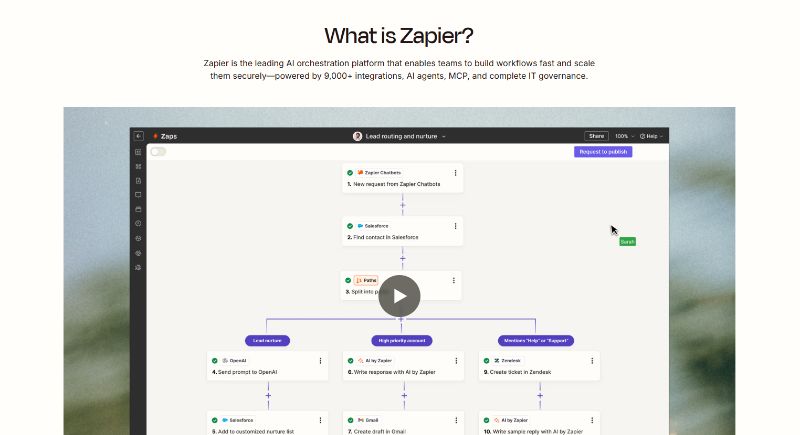
Zapier is one of the most recognizable names in no‑code automation. Since launching in 2012, it has become an industry‑standard tool for connecting web apps and automating tasks. A recent review notes that Zapier supports 8,500+ native integrations and offers multi‑step workflows, conditional logic, delays and webhooks. The platform allows users to build “Zaps”—automated workflows that connect triggers and actions across apps such as Google Sheets, Slack, HubSpot, Salesforce, Stripe, Shopify, Notion and thousands more. For example, when a new row is added to a spreadsheet, Zapier can automatically create a lead in your CRM and send a Slack notification.
Zapier’s product lineup has expanded beyond simple “if this, then that” automation. Its flagship features now include:
- Zaps: The core workflow builder that allows users to create multi‑step automations with triggers, actions, filters and conditions. Zaps can branch into different paths based on logic and include delays, but they cannot loop or iterate over lists.
- AI Workflows and Copilot: Newer AI features that allow users to describe what they want in natural language and generate Zaps automatically. Zapier Copilot can suggest automations and refine them in plain English.
- Tables and Interfaces: Databases and simple front‑end apps for capturing and storing data, which can be used within Zaps.
- Chatbots and Agents: Tools that let customers build AI chatbots and agents using their own data and connect them to over 9,000 apps.
- Canvas: A visual planning tool for mapping workflows, planning processes and collaborating across teams (announced in 2026).
Ease of use and learning curve
One of Zapier’s biggest strengths is its accessibility. The Hackceleration review notes that non‑technical users can set up their first Zap in around three minutes. The drag‑and‑drop visual builder makes it easy to chain actions together and test workflows. Built‑in authentication for common services means users seldom have to manage API keys. There are thousands of templates for common workflows that help beginners get started quickly. However, the same review points out that more advanced features—such as conditional paths, filters and custom webhooks—require some understanding of logic and can become confusing. Error logs can be opaque, and there is no staging environment for testing changes.
Integrations, reliability and cost
The breadth of Zapier’s app ecosystem is unmatched. With over 9,000 integrations, users can automate nearly any combination of business tools. Zapier’s infrastructure has matured over 13 years and is considered reliable. The company positions itself as an enterprise‑grade platform with SOC 2 compliance and governance tools. However, this reliability and integration breadth come at a cost. Zapier’s pricing is based on a task‑counting system, where each action in a Zap counts against your monthly quota. The free plan offers only 100 tasks per month and that the Professional plan ($19.99–$29.99 per month) includes 750 tasks, while the Team plan ($69–$103.50 per month) includes more tasks. Complex automations can burn through tasks quickly, making Zapier expensive compared with open‑source alternatives like n8n.
Limitations and trade‑offs
Despite its strengths, Zapier has limitations. Reviews note that it does not support loops or iterating over arrays, making some workflows impossible without splitting them across multiple Zaps. Error handling is basic, with limited retry and branching mechanisms, and there is no version control to roll back changes. The platform is proprietary and does not allow self‑hosting, which may be a concern for companies with strict data‑control requirements. Pricing escalates with usage, and the cost of running large automations can become prohibitive.
Why it matters
Zapier excels at what it does: gluing together existing tools. It is ideal for teams that already use multiple SaaS products and need to automate processes across them. Marketers can sync leads between forms and CRMs, sales teams can automate follow‑ups, and operations teams can keep systems in sync. The platform’s reliability, templates and enterprise governance make it attractive for small businesses and large organizations alike. However, because it focuses on connecting services rather than providing end‑to‑end business functionality, users still need to manage their own website, payment processing, hosting, content and marketing infrastructure.
Comparing Willo and Zapier
Scope: business creation vs task automation
The most fundamental difference lies in scope. Willo aims to build and run a business from scratch. It creates the website, sets up infrastructure, handles payments, publishes content, runs marketing campaigns and monitors finances. Zapier, conversely, is a connector. It automates repetitive tasks across existing apps but doesn’t provide the apps themselves. If you want an e‑commerce store, you still need Shopify or WooCommerce; if you need a blog, you still need WordPress; Zapier simply moves data between them. Willo provides an integrated stack so you don’t need to assemble separate services.
AI capabilities and automation style
Both platforms leverage AI, but they use it differently. In Willo, AI agents perform complex tasks autonomously. The Product agent writes code and deploys the site; the Content agent researches topics and writes articles; the Marketing agent runs campaigns. These agents not only generate content but execute actions across the business. Zapier’s AI features, meanwhile, help users build automations faster (through AI Workflows and Copilot) and add AI steps to a Zap (for example, using OpenAI to summarise text). The AI in Zapier is assistive—it helps automate tasks but does not orchestrate a multi‑agent business operation.
Technical complexity and user control
Users do not choose their stack or worry about scaling; everything is predetermined. While this simplifies the experience, it also means less control—if you need a specific framework or design, you may not get it. Zapier, in contrast, gives users granular control over workflows and integrates with existing systems. However, setting up complex workflows can require understanding logic, handling errors and managing API credentials. Zapier also lacks some advanced features found in developer‑focused platforms (no loops, limited retry options).
Pricing and ownership
Willo’s pricing is clearly structured across three plans, Starter, Growth, and Scale, each with defined credits, agent runs, and included features. Starter covers the essentials like AI-generated business strategy, autonomous execution, and a ready-to-use landing page. Growth expands into scaling tools such as revenue integrations, automated marketing, and custom domains, while Scale adds higher limits, priority execution, and deeper analytics, making the progression straightforward as usage increases. Zapier’s pricing can quickly become expensive for high‑volume automation because of task counts. One advantage of Willo is that you own a complete codebase hosted on GitHub, whereas Zapier is proprietary and doesn’t allow self‑hosting or code export.
Summary of differences
Below is a concise comparison of key aspects:
- Purpose – Willo: build and operate a business; Zapier: automate tasks across apps.
- Infrastructure – Willo: provides website, payment, hosting and analytics out of the box; Zapier: relies on existing apps.
- AI approach – Willo: multi‑agent system that executes tasks automatically; Zapier: AI assists with building workflows and adds AI steps.
- Integrations – Willo: integrated stack with a few built‑in providers; Zapier: 8,500–9,000+ app integrations.
- Ease of use – Willo: simply describe your idea; Zapier: drag‑and‑drop builder but advanced features have a learning curve.
- Pricing model – Willo: subscription (exact pricing still evolving); Zapier: tiered plans with task‑based usage.
Who is each platform for?
Willo’s ideal users
Willo is built for entrepreneurs, solopreneurs and small teams who want to test or run a business without hiring developers or marketers. It suits founders who have a clear idea but lack the time or skills to build a website, set up payments, write SEO content, run ads and manage support. It’s also ideal for side‑hustle builders, content creators and consultants who want to spin up and scale multiple micro‑businesses quickly.
Zapier’s ideal users
Zapier is aimed at businesses and teams that already use multiple SaaS apps and need to automate manual workflows. Marketers can automate lead routing and campaign reporting; sales teams can sync CRM data; operations can connect spreadsheets to databases; HR can onboard employees across tools. Because Zapier supports thousands of integrations, it’s useful for organizations of any size that want to eliminate repetitive data entry and ensure systems stay in sync.
Why choose Willo over Zapier?
Willo makes sense when you want a one‑stop solution that takes your idea and turns it into a functioning business. If you don’t have a website or payment infrastructure, or if you don’t want to assemble and manage multiple tools, Willo’s integrated stack and autonomous agents remove those tasks entirely. The platform’s continuous plan‑execute‑reflect cycles means your business is always evolving. Zapier cannot provide this; it can only automate tasks between apps you already own.
Why choose Zapier over Willo?
Zapier is the clear choice when you already have a product or site and need to connect different tools. It offers unparalleled integration breadth, reliable automation and enterprise governance. If your organization uses best‑in‑class apps and needs to keep them in sync, Zapier provides the glue. It’s also suitable if you need full control over your tech stack or must comply with specific data policies. Willo, with its pre‑built stack, might be too restrictive for companies with established infrastructure.
Conclusion
Willo and Zapier both tap into the power of AI and automation, but they solve different problems. Willo is an ambitious attempt to automate the creation and operation of a business. By providing an integrated stack and autonomous agents that handle research, development, content, marketing and finance, it compresses the time and skills needed to launch and scale a venture. Zapier, meanwhile, is the leading automation platform for connecting existing apps, boasting thousands of integrations and a user‑friendly workflow builder. It is trusted for reliability and governance but is limited by its task‑based pricing and the complexity of building advanced flows.
Choosing between them depends on your goals. If you want to spin up a business with minimal setup and let AI handle the heavy lifting, Willo offers a compelling, albeit opinionated, system. If you need to connect and automate the tools you already use, Zapier remains the go‑to solution. The rise of AI means both types of platforms will continue to evolve, and understanding where each fits is key to making the right choice for your projects and business.
Start using Willo today and see the difference for yourself.