Software creation has historically required a combination of programming knowledge, local development tooling and the patience to stitch together front‑end, back‑end and hosting services. In late‑2024 a new browser‑based builder called Bolt appeared and promised to collapse that workflow into a single conversation with an AI agent.
Instead of installing Node.js, provisioning a database and writing boilerplate code, just describe what you want to build and watch as the system scaffolds an entire project directly in your browser. Bolt combines a browser‑native runtime with large language models that interpret plain‑language prompts and generate full‑stack React/Node applications complete with authentication and API routes.
The company behind Bolt developed WebContainers, a technology that runs Node.js and an entire development environment inside your browser, eliminating the need for remote servers and dramatically reducing latency. This review looks at Bolt as it exists in 2026, focusing on its speed, performance, pricing, and real‑world use cases.
Curious how it stacks up against Willo? Check out our comparison between Bolt and Willo.
What is Bolt and How Does It Work?
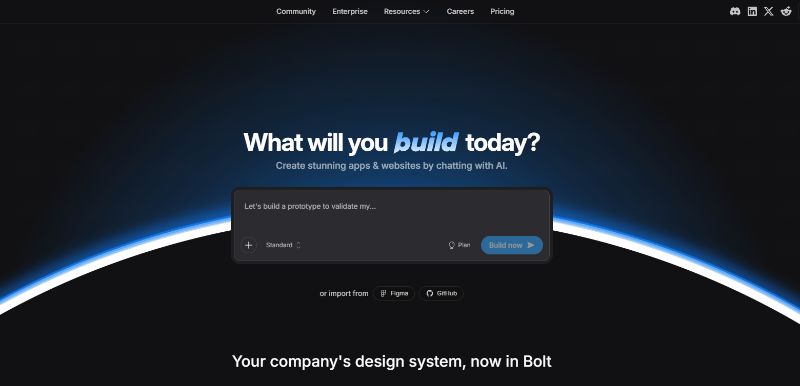
Bolt is essentially a coding agent integrated with a browser‑based IDE. When you open the tool, you are greeted by a simple input box asking “What should we build today?” and options to import from Figma or GitHub. You describe an application—for example “Build a blog with Astro and Tailwind,” or list out specific features—and Bolt’s AI expands the idea into a structured specification. According to reviewers, the prompt enhancer converts free‑form language into sections such as the tech stack, authentication, data schema and API endpoints. The system then generates the project file‑by‑file, installing packages and creating front‑end components, back‑end routes and database schema while showing each step in real time. The process leverages WebContainers, allowing Node.js and npm to run directly in the browser so there is no network latency during file generation. When the build completes you can toggle between a code view and a live preview. The preview updates instantly as the AI writes code, and you can edit the code yourself or use natural language to refine design and functionality.
Bolt is not limited to web UIs. The code generated is standard React/Vite and can be downloaded or exported to GitHub. Integrations with Expo allow the same prompt to yield a native mobile app. Versions released in 2025 and 2026 introduced Bolt Cloud, a platform that adds built‑in databases, authentication, file storage, edge functions, analytics and hosting, turning the builder into a more complete platform for deployment.
Speed and Performance
One of Bolt’s primary selling points is speed. Because WebContainers run the full Node.js runtime locally in your browser, there is no waiting for remote instances or container provisioning. Benchmarks published in January 2026 showed a 40 % improvement in build performance compared with the 2024 version. Users report that generation happens in seconds and the preview loads almost instantly, giving the impression that the AI is “insanely fast”. Bolt v2 also introduced a self‑healing runtime that monitors the console, network and build logs. If a dependency conflict or runtime error occurs during build, the agent analyzes the stack trace and applies a fix automatically, continuing the loop until the app runs. This autonomous debugging reportedly reduces error loops by 98 %, meaning fewer manual interventions and less time spent fixing generated code. The 2026 version also handles projects that are 1 000 times larger than the 2025 release due to improved context management and optimization of its generation pipelines. These enhancements make Bolt capable of scaffolding complex applications that previously exceeded its context window.
However, the high speed comes with caveats. Independent testers observed that the preview environment can be unstable for larger apps, producing port conflicts or compilation errors that require manual fixes. When errors occur, Bolt still consumes tokens, which can quickly deplete the allowance in free or lower‑tier plans. Some reviews also noted that the platform struggles to retain context when a project exceeds 15‑20 components, and small changes can inadvertently break other parts of the app. Overall, the performance improvements are real, but reliability still varies with project complexity.
Features and Capabilities
Bolt packs a broad set of capabilities into its single‑page interface. Below is a summary of the key features noted in 2026 reviews and product documentation.
Full‑Stack Generation and Editing
- AI‑driven scaffolding: You describe an app in plain language, and the agent builds it from scratch, including the front‑end components, back‑end logic, database models and API routes. The prompt enhancer turns rough ideas into structured specifications and expands on missing details.
- Complete IDE: Bolt provides a file explorer, code editor, terminal and package manager directly in your browser. Generated files can be inspected and edited like a regular codebase.
- Self‑healing runtime: The built‑in debugging engine detects and fixes many errors automatically, reducing error loops by 98 %.
- Context management: Upgrades in 2026 enable the platform to handle projects 1 000 times larger than earlier versions, preserving state across larger codebases.
Visual Preview and Design Tools
- Live preview: A toggle switches between code view and a responsive preview. As the AI writes code, the preview updates instantly. Responsive controls let you view the app on phone‑sized screens and adjust zoom percentages.
- Visual editor: You can click elements within the preview to select and modify them. The system highlights components and provides controls for styling without touching code.
- Prompt‑based styling: Design changes can be requested through natural language, and the AI will refactor the UI—for example, to apply a minimalist theme or adjust colors.
- Figma import and design systems: Bolt supports importing Figma designs, enabling design‑to‑code workflows. In 2026 it added design system templates and allows you to build apps using your organization’s brand guidelines directly in the platform.
Integrations and Automation
- Built‑in backend and hosting: Bolt Cloud includes unlimited databases, user management and authentication, SEO optimization, analytics and hosting with custom domains. These features remove the need to stitch together multiple third‑party services.
- External integrations: Bolt connects to Supabase for database services, Stripe for payments, Netlify for deployment, Expo for mobile apps, Figma for design import and GitHub for version control. Selecting a mobile target triggers Expo integration so you can test the app on your phone.
- Model flexibility: The platform uses large language models to generate code. In 2026 it added options to choose between models of different reasoning depth to balance speed and cost.
- Token system: Every generation, error fix or follow‑up consumes tokens. Unused tokens in paid plans roll over for up to two months.
Pricing and Plans
Bolt uses a freemium model. You can start building without a credit card, and pay only when you need more tokens or premium features. Plans are summarized below (prices in US dollars for monthly billing):
| Plan | Monthly price | Token allowance | Key features | Best for |
| Free | $0 | 1 M tokens/month (300 K daily cap) | Unlimited databases and hosting with Bolt branding | Students, hobby projects and early experiments |
| Pro | $25 | 10 M tokens/month | Custom domains, no branding, SEO tools and AI image editing | Solo developers and freelancers working on production‑ready apps |
| Teams | $30 per member | Shared token pool (10 M+ monthly) | Centralized billing, team access management and shared design systems | Small agencies and product teams |
| Enterprise | Custom | Custom token scaling | Single sign‑on (SSO), audit logs, compliance support and dedicated account manager | Large organizations needing high‑level security |
Tokens are the currency that powers AI generation. Each prompt, revision or debugging step consumes tokens; complex prompts consume more. Free tier projects are subject to Bolt branding and a 10 MB upload limit. Paid plans remove branding and raise file‑size limits. Reviews recommend starting with the Free tier to test the workflow and upgrading to Pro once you need custom domains or exceed the token cap. Note that Bolt subscriptions are billed via Stripe, can be canceled anytime, and unused tokens in paid plans roll over for up to two months. Refunds are generally unavailable unless there is a verified quality issue.
Practical Use Cases
The appeal of Bolt lies in how quickly different roles can go from idea to working software. Its website lists several personas and use cases that showcase the tool’s versatility:
- Product managers can build prototypes and test user flows in hours. They can validate features with stakeholders before the engineering team begins coding.
- Entrepreneurs can launch an entire business—from a landing page to a functioning product—in days, not months.
- Marketers can spin up high‑performing campaign pages with SEO and hosting included, making it easier to test messaging and capture leads.
- Agencies can deliver more projects without increasing headcount. By leveraging Bolt’s automation and built‑in infrastructure, agencies can scale output and focus on client strategy.
- Students and hobbyists can learn by doing. Bolt allows those with little programming experience to experiment with full‑stack apps and see the results instantly.
Beyond role‑based examples, reviews highlight that Bolt is well‑suited for hackathons, internal tools and early‑stage product validation. Its ability to accept long prompts and generate structured code makes it a good choice for prototypes, MVPs and internal dashboards. Because the generated code can be downloaded, experienced developers can treat Bolt as an advanced scaffolding tool—generate the initial structure quickly and then refine it in their own IDE. Mobile support via Expo expands these use cases into native app prototypes.
Advantages and Drawbacks
Advantages
- Speed: WebContainers and local execution mean generation happens in seconds; 2026 benchmarks indicate a 40 % performance improvement over 2024.
- All‑in‑one environment: The platform combines code editor, terminal, file explorer, database provisioning and preview in the browser.
- Autonomous debugging: Self‑healing runtime significantly reduces error loops and can automatically resolve many build failures.
- Scalable context: Bolt v2 handles projects 1 000 times larger than earlier versions.
- Design‑to‑code workflows: Figma import, design system templates and natural language styling enable non‑developers to produce polished UIs.
- Integrated hosting: Bolt Cloud offers unlimited databases, user management, SEO optimization, analytics and custom domains out of the box.
Drawbacks
- Reliability: Reviews report that the preview sometimes fails to load, especially for larger apps, and auto‑fix routines cannot solve all errors.
- Token consumption: Complex applications burn through tokens quickly. Free and Pro plans can be exhausted mid‑project, leading to extra spending.
- Limited collaboration: The Teams plan adds shared billing and design systems but does not support real‑time multi‑user editing, so teams may need to rely on external tools for collaboration.
- Context retention: Some reviewers note that projects exceeding 15–20 components lose context, causing the AI to misinterpret follow‑up requests and potentially break existing functionality.
- Production readiness: While Bolt Cloud offers hosting, its infrastructure is still new. For enterprise workloads with strict compliance or uptime requirements, teams may need to export the code and deploy on established cloud providers.
Final Thoughts
Bolt’s promise is simple: move from idea to working software by chatting with an AI agent. The combination of WebContainers, large language models and built‑in infrastructure means you can generate a full‑stack React/Node application in a matter of minutes and see it running in your browser. The 2026 release improved speed by 40 %, introduced self‑healing debugging that cuts error loops by 98 % and expanded context windows to support much larger projects. Free and affordable entry points make it accessible for experimentation, and the generated code can be exported and extended, which appeals to professional developers.
Nevertheless, Bolt is not a silver bullet. Reliability issues in the preview environment, token consumption traps and limited collaboration features mean that it is best suited for rapid prototyping, hackathons and small‑ to medium‑sized projects. For production‑grade applications, you may still need to invest significant time in deploying, integrating third‑party services and refining the AI‑generated code. Even so, Bolt has proven that in‑browser development environments combined with AI can radically accelerate software creation. If you need to validate an idea quickly or build an MVP without setting up your own stack, Bolt is one of the most capable tools available in 2026.