The generative AI landscape is full of tools promising to shrink the distance between idea and output. Some target designers with AI‑assisted layouts, others help marketers write copy, and a growing number tackle the thorny task of writing code. Willo and Bolt both sit in this world, but they address very different problems. Willo builds and operates complete businesses with a team of AI agents. Bolt, by contrast, focuses on turning natural‑language prompts into full‑stack applications that run in your browser. This article compares these two platforms across capabilities, workflows and intended users, highlighting where each excels and where trade‑offs emerge.
Willo: Building and Running Businesses
Willo is an AI business builder, not just a development tool. The process begins when a founder describes their idea in plain language. Willo’s platform then performs market research, defines positioning, sets up a custom website and infrastructure, configures payment processing and analytics, and spins up marketing and content campaigns. In other words, it bundles what would normally be multiple services—Stripe integration, hosting, CMS, analytics and outreach—into one system. Users don’t have to choose and connect separate services; the business is live within minutes.
A coordinated team of agents
At the heart of Willo is a set of seven specialised agents. Each agent plays a role akin to a department in a small company:
- CEO agent interprets the founder’s vision and sets strategy.
- Product agent builds and updates the site and backend code.
- Research agent analyses competitors and market trends.
- Marketing agent crafts positioning and runs campaigns.
- Content/SEO agent writes articles, landing pages and marketing copy.
- Support agent drafts responses to customer queries.
- Finance agent monitors revenue and spending.
These agents don’t work in isolation; they operate on a plan–execute–reflect cycle. Each cycle begins with planning based on recent performance, followed by execution of tasks like publishing content or launching ads, and ends with reflection to adjust strategy. This loop repeats continuously, meaning the business evolves even when the founder isn’t manually directing each action.
Why Willo matters
Willo’s approach tackles a common bottleneck: connecting all the pieces needed to run a venture. By automating research, development, marketing and support, it reduces the time and cost required to test and grow a business. It also provides a framework that encourages consistent execution through its cyclical planning. However, the convenience comes with constraints. Because Willo controls the stack end‑to‑end, users must accept its infrastructure choices and may find deep customisation or bespoke integrations more difficult. For many solo founders or small teams, though, the trade‑off is worth it because it enables them to focus on vision and product direction rather than day‑to‑day operations.
Bolt: In‑Browser App Generation
Converting prompts into apps
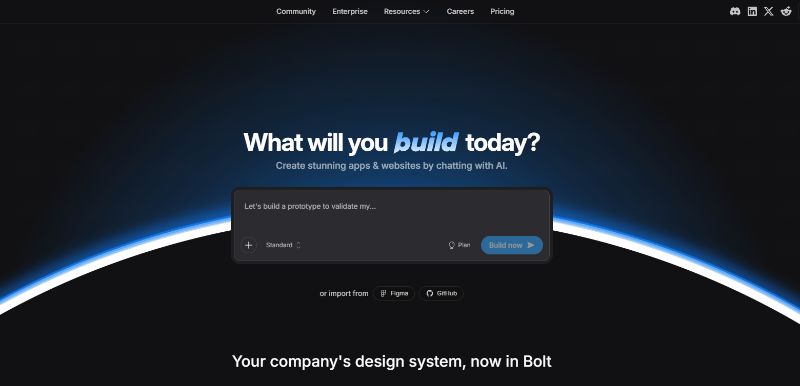
Bolt is an AI‑powered app builder created by StackBlitz, the company behind WebContainers. It is designed to let anyone type a description and watch a working website or application materialise in seconds. Instead of writing code line by line, users describe what they want: “build a to‑do list app with login” or “generate a dashboard with charts”, and Bolt generates the entire frontend, backend and everything in between.
The platform translates natural‑language prompts into production‑ready code using large language models and runs the development environment entirely in your browser through WebContainers. This client‑side environment means there is zero local setup and no need to install Node.js or other tools.
Because it leverages StackBlitz’s underlying technology, Bolt emphasises speed. Live previews appear as code is generated, and users can switch between AI‑generated code and manual editing without leaving the browser. The platform is marketed as suitable for non‑technical creators who want to prototype quickly and for experienced developers who want to save time on boilerplate work. Bolt uses a token‑based pricing model where each AI generation consumes tokens; plans range from free tiers for small projects to paid tiers for higher usage.
Cloud platform and workflow
Bolt is more than a code generator; it comes with an ecosystem called Bolt Cloud. This platform provides an all‑in‑one hub for publishing, launching and managing everything built with Bolt. It hosts full‑stack applications, manages databases and handles custom domains within a clean, browser‑based editor. Key workflow features include:
- Database management – Every new project automatically gets a database space you can manage through the dashboard. Bolt Cloud also supports connecting to Supabase for scalable storage and custom backend logic.
- Interaction discussion mode – Before committing changes, users can brainstorm with the AI about layouts, interactions or user experience improvements. This mode acts like a design coach, offering suggestions in plain language.
- Hosting and domains – Each project comes with a free Bolt URL and can be published instantly. Users can also connect custom domains or export their projects to host on platforms such as Netlify.
- Context and references – Users can upload images, CSVs or other files to give the AI context for better results. This helps tailor the generated code to specific requirements.
- Project control and versioning – Bolt allows downloading a local copy of generated code and limiting AI edits to specific files to prevent unintended changes. It also tracks every change in a built‑in version history so you can restore earlier versions along with chat history and database state.
Technology and evolution
Bolt’s technology stems from StackBlitz’s WebContainers, which run a complete Node.js environment inside the browser. This innovation eliminates the need for remote servers during development and leads to faster generation cycles. The team integrated a powerful language model allowing Bolt to understand plain English prompts and build full applications, including both front‑end and back‑end components. The app builder also supports mobile development via Expo, enabling users to test on iOS and Android by scanning a QR code.
Bolt is available through multiple pricing tiers. A free plan provides limited tokens and includes Bolt branding, while paid plans (Pro, Teams and Enterprise) offer larger token limits, branding removal, custom domains and enterprise features such as single sign‑on. The token system means costs rise with the complexity and number of revisions; user reviews have pointed out that refining or debugging a project can quickly consume credits.
Strengths and limitations
Bolt shines when you need to go from idea to working app quickly. It’s excellent for rapid prototyping, internal tools and educational projects. User testimonials on G2 highlight that you can describe what you want in natural language and have Bolt generate a full‑stack app in the browser. The inclusion of built‑in hosting, database management and integrations with services like GitHub and Supabase makes it flexible for small projects.
However, Bolt does not manage everything a production application requires. It focuses primarily on code generation; you remain responsible for deploying, maintaining and scaling the app. According to Taskade’s review, Bolt generates React/Vite applications and leaves hosting, authentication and DevOps tasks to the user. While Bolt Cloud now offers built‑in hosting and databases, the platform still expects users to handle more complex infrastructure for enterprise use cases. Reviews also note that complex prompts or multiple iterations can quickly deplete credits, making the pricing less transparent. In short, Bolt is a powerful code accelerator but not a business execution engine.
Key Differences Between Willo and Bolt
Problem scope
The most fundamental difference lies in what each tool promises to deliver. Willo aims to build and operate a business, creating a site, managing infrastructure, handling payments, publishing content and running marketing, all through a coordinated team of agents. Bolt, on the other hand, targets software generation. It converts natural language into functional code and offers some hosting and database management, but it doesn’t handle market research, marketing campaigns or customer support. If you need to run a company end‑to‑end, Willo is closer to a “business in a box.” If you only need a fast way to build a prototype or internal tool, Bolt suffices.
Automation vs assistance
Willo’s agents operate autonomously; they plan, execute and refine tasks without constant prompts, continuously growing the business. Bolt’s AI requires more prompting and control. It assists you by writing code and suggesting design changes, but you must decide when to generate code, how to structure your prompts and when to deploy. The interaction discussion mode acts like a brainstorming partner, not a do‑everything agent.
Technical flexibility
Willo’s integrated stack is designed for non‑technical users or founders who want to avoid infrastructure. This reduces flexibility: users can’t choose alternative frameworks or hosting providers easily. Bolt offers more control. You can export the generated code, integrate external databases like Supabase and host the application wherever you like. For technical teams or developers who want to customize, this is a significant advantage. The trade‑off is that you’ll be responsible for maintenance and DevOps tasks.
Costs and pricing models
Willo’s pricing follows a clear three-tier structure, Starter, Growth, and Scale, with each plan outlining specific credits, agent runs, and capabilities. Starter is built for launching, with core tools like AI strategy, execution, and a deployed landing page. Growth introduces monetization and marketing automation features, while Scale expands capacity further with priority execution and advanced analytics, creating a logical progression as the business grows. Bolt uses a credit‑based system where each generation consumes tokens; free plans offer limited daily quotas, and paid plans expand token allowances and remove branding. Users must monitor token consumption carefully; multiple iterations or complex prompts can increase costs quickly.
When to Choose Willo or Bolt
Consider Willo if you want:
- A fully integrated business system that handles research, site creation, payments, marketing and ongoing growth through AI agents.
- Continuous execution without having to prompt the system at every step, allowing you to focus on product direction.
- A low‑code/no‑code solution that abstracts away infrastructure decisions.
Consider Bolt if you want:
- To turn natural language prompts into functional web, mobile or full‑stack applications quickly.
- More technical control, ability to edit and export code, choose your database provider, and host wherever you prefer.
- Built‑in tools like Bolt Cloud for hosting, database management and version control, without full commitment to a business automation platform.
Choosing between full systems and standalone apps
Willo and Bolt represent two divergent paths in the generative AI landscape. Willo assembles a digital team that builds and runs a business, automating everything from market research and site creation to marketing and customer support. Bolt is a code generator that converts prompts into full‑stack applications in the browser using WebContainers.
Choosing between them depends on whether you need to build a business or a product. Entrepreneurs who want to launch and operate a venture with minimal setup may find Willo’s integrated agents invaluable. Developers and teams who need rapid prototypes or prefer hands-on control will appreciate Bolt’s speed, flexibility and in‑browser tooling.
If you want to see Willo in action, you can sign up for a free account today.