Turning an idea into a working product used to take months. You needed a team to research the market, design and build a website, write code, set up hosting, handle payments and analytics, publish content, run marketing campaigns and support customers. Advances in generative AI have changed that calculus, but not all AI tools solve the same problem. Some are designed to help developers write better code. Others are designed to help founders launch and run an entire business.
In this article we contrast Willo, an end‑to‑end platform for building and operating a business, with Cursor, an AI‑first integrated development environment (IDE) geared toward professional developers. Understanding where these tools excel helps you decide which one moves your idea forward.
Willo: A system for building and running a business
Start with your idea, not your tech stack
Willo is an AI business builder platform rather than a single tool. You start by describing the business you want to create. From that single input, Willo’s system of autonomous agents carries out the work required to turn that concept into an operational business. It conducts market research, builds a customized website and infrastructure, configures payment processing and analytics, creates content and campaigns, and continues to grow the business through weekly plan–execute–reflect cycles.
Instead of forcing you to choose and connect multiple SaaS products, Willo provides a complete stack: payment processing with Stripe, a custom‑coded site deployed via GitHub and cloud hosting, built‑in analytics and growth tools, transactional email and outreach, and a CMS for managing content. Everything is set up automatically, so there is no friction before you see a live business.
A team of specialised AI agents
Willo’s core innovation is the way it organises AI into specialised roles. The platform deploys seven autonomous agents: the CEO, Product, Research, Marketing, Content, Support and Finance agents, each responsible for a key business function. For example:
- CEO agent – defines the high‑level strategy and priorities.
- Product agent – builds the website and configures infrastructure.
- Research agent – performs market and competitor analysis.
- Marketing and Content agents – plan and execute campaigns, write SEO‑optimised articles and publish them.
- Support and Finance agents – handle customer communications and monitor revenue/costs.
These agents collaborate through a weekly plan–execute–reflect cycle. They review performance, propose tasks for the next cycle, execute those tasks and then analyse the results.
Why it matters
Most entrepreneurs struggle to move past the idea stage because execution requires so many different skills. By automating research, development, marketing and operations, Willo reduces the gap between concept and reality. You are still responsible for direction and decision‑making, but the system does the heavy lifting. This makes it possible to launch and operate multiple businesses or side projects without burning out.
Cursor: An AI‑first IDE for professional developers
Built on VS Code with AI woven throughout
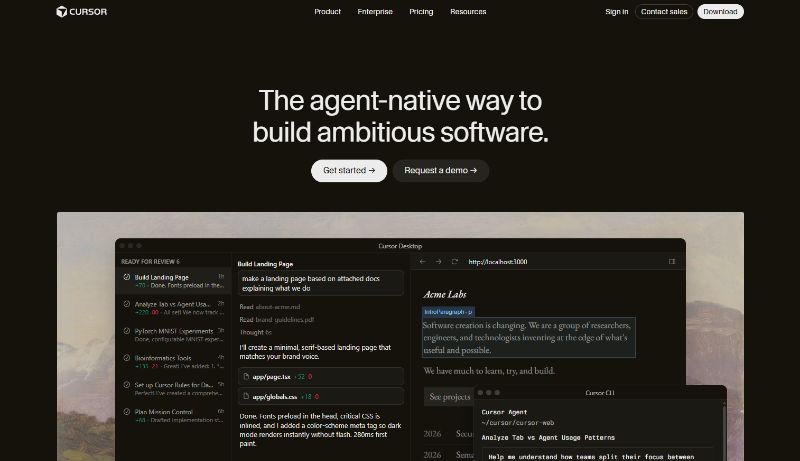
Cursor is a standalone code editor built on VS Code. Rather than bolting AI onto an existing editor, the Cursor team rebuilt the IDE around AI. The result is a familiar VS Code environment, your extensions, keybindings and themes still work, but with AI features baked into every part of the experience. Cursor indexes your entire project, so its suggestions and refactors reflect your functions, types and patterns, not just generic snippets.
The platform offers several notable features:
- Supermaven autocomplete. Cursor integrates the Supermaven engine, which provides fast, multi‑line code completions that match your project’s conventions. It handles imports automatically and feels like an extension of your own typing.
- Agent mode (Composer). You can describe a task in natural language: “add rate limiting to all API endpoints with Redis‑backed 429 responses”, and the AI edits multiple files, runs terminal commands, installs packages and iterates until the task is complete.
- Background agents. Cursor can clone your repository in the cloud and spin up autonomous agents that work on tasks in parallel. When a task finishes, it opens a pull request for your review. This frees you to continue coding locally while AI tackles well‑defined tasks.
- Model flexibility. You can choose between large language models from OpenAI, Anthropic or Google, or let the Auto mode select the best model for each request.
Where Cursor shines
Cursor excels at tasks that involve writing and maintaining custom code. The AI is deeply aware of your codebase, making it ideal for refactoring complex logic, adding new features or optimising performance. The background agents feature acts like a junior developer who can tackle smaller tickets while you focus on harder problems. Because it is built on VS Code, there is virtually no transition cost, developers can keep their existing workflow and gain AI assistance.
Honest limitations
Cursor remains a tool for developers, not non‑coders. If you cannot read or write code, it cannot build an application for you. Even with agent mode, you are still producing code that you must deploy, connect to a database, maintain and debug. Cursor does not handle hosting, payments or infrastructure; those responsibilities remain with the developer. The experience is also mostly single‑player, there is no real‑time collaboration for non‑technical stakeholders.
The credit system can confuse new users and that AI output is inconsistent on roughly 20–30% of tasks. The interface layers chat panels and agent windows over VS Code, which some developers find cluttered. Cursor is a standalone IDE; its AI features do not extend to other editors like JetBrains or Vim. For large monorepos, indexing and context computation can add noticeable latency.
Why it matters
For professional developers, Cursor represents a leap forward in productivity. Background agents allow you to delegate tasks in parallel, effectively multiplying your output. However, Cursor is not a no‑code tool; it assumes you are comfortable with software development. If you need a ready‑to‑use business system rather than a code editor, you will need additional tools for hosting, payments and operations.
Key differences
Scope and focus
Willo and Cursor operate at different layers of the stack. Willo’s aim is to deliver an entire business—including research, branding, website, payments, content marketing and customer support—without the founder having to build or integrate these components. Cursor, by contrast, is a developer tool designed to make software creation faster. It does not handle marketing, payments or growth; instead, it assumes those responsibilities will be addressed by other systems or by the developer.
Autonomy vs assistance
Willo’s agents execute entire workflows. They decide what to build, create content, run campaigns, analyse results and iterate without requiring you to write or review code. You act as a founder guiding strategy, not as an operator doing the tasks. Cursor’s AI is more assistive: it accelerates code writing and can handle well‑defined tasks across files, but you remain responsible for reviewing diffs, deploying the code and ensuring the system functions correctly. The AI acts like a smart pair programmer rather than a CEO, marketer or operations manager.
Technical requirements
Willo is designed for people who may not code at all. It abstracts away the technical details and uses AI agents to deliver working business outcomes. Cursor is designed for skilled developers who understand software architecture and want to work faster. If you cannot code, Cursor cannot magically build a product for you.
Infrastructure and deployment
Willo handles hosting, payments, analytics and growth out of the box. Once you describe your business, your site goes live with payments configured. Cursor produces code that must be deployed somewhere; you still need to set up hosting, CI/CD pipelines, databases and other infrastructure. For many startups, this difference determines how fast you can start serving customers.
Collaboration and team roles
Willo’s multi‑agent system reflects real business roles: strategy, product, research, marketing, content, support and finance. This makes it easier for non‑technical stakeholders to understand and guide the system. Cursor is primarily a single‑user development environment. There is a Teams plan with shared rules and analytics, but the core experience is geared toward individual programmers.
When to use each platform
Use Willo if you want to:
- Launch a business without writing code or stitching together multiple SaaS tools.
- Test different ideas quickly and iterate based on real market feedback.
- Focus on strategy and vision while the system handles execution.
- Maintain momentum after launch with continuous content creation, marketing and growth.
Use Cursor if you want to:
- Build custom software with full control over the code.
- Speed up engineering work with powerful autocomplete and multi‑file editing.
- Delegate well‑defined coding tasks to AI agents while you tackle more complex problems.
- Stay in your familiar VS Code environment while adding AI capabilities.
Picking the right tool based on what you actually need to build
Willo and Cursor both harness generative AI, but they serve different audiences and solve different problems. Willo is an end‑to‑end system that turns ideas into businesses by automating research, development, marketing and operations. Its agents act like a cross‑functional team, producing a live business without requiring you to assemble a tech stack or hire specialists. Cursor, on the other hand, is a developer‑centric IDE that dramatically accelerates coding through deep codebase indexing, multi‑line autocomplete, chat‑based editing, agent mode and background agents. It helps you write and manage custom code faster, but you still need to deploy and operate the resulting software.
Choosing between them depends on your goal. If you want to validate a business concept or run multiple ventures without becoming a technical operator, Willo aligns with that vision. If you are a professional developer working on complex applications and need to boost your productivity, Cursor provides AI‑powered coding superpowers. In some situations, you might even use both: Willo to handle non‑technical business functions and Cursor to build the proprietary software that sets your product apart. Understanding their strengths and limitations ensures you invest your time and resources in the right tool for the job.
Ready to try it out? Start with a free Willo account.